When a business decides on a computer donation for nonprofit organizations, it’s more than just a good deed. It's a strategic move that strengthens corporate social responsibility, provides a secure and sustainable IT asset disposal solution, and turns surplus technology into critical tools that empower nonprofits to better serve their communities. This guide outlines the process for businesses looking to make an impactful and compliant technology donation.
The Strategic Value of Donating Computers
Donating used IT equipment isn’t just charity; it’s a smart business decision with layers of benefits. For any modern company, it's a fantastic way to build out a real-world Corporate Social Responsibility (CSR) program. When you direct still-useful assets to organizations that need them, you create a powerful story of community support and responsible business practices. That story enhances your brand's public image in a genuine way.
This kind of positive reputation really connects with customers, employees, and even investors, who are all looking to partner with companies that care. But beyond the brand boost, donating computers is a hands-on way to participate in the circular economy. You're extending the life of perfectly good hardware instead of sending it off to be recycled prematurely, which is a core principle of sustainable IT Asset Disposition (ITAD).
Empowering Nonprofits and Amplifying Impact
For the nonprofit on the receiving end, a donation of technology can be a complete game-changer. Most of these organizations are running on tight budgets, and buying updated computers is often a huge financial hurdle.
With access to reliable equipment, they can suddenly:
- Improve Operational Efficiency: Finally manage donor lists, streamline daily admin work, and coordinate volunteers without fighting outdated tech.
- Expand Program Reach: Offer digital literacy classes to the community, provide resources for job seekers, or give people access to essential online services.
- Enhance Fundraising and Communication: Create professional-looking marketing materials, run effective online campaigns, and connect with supporters through social media and email.
The demand for this kind of technology is huge. You can get a sense of the need just by looking into the work involved in securing laptop grants for nonprofits; your donation helps fill a very real gap that these groups are constantly trying to bridge.
A Pillar of Sustainable ITAD Strategy
Weaving donations into your ITAD strategy also brings clear operational benefits. It creates a responsible path for equipment that might not meet your company's high-performance needs anymore but is more than capable of handling a nonprofit's day-to-day tasks. This approach keeps functional electronics out of the e-waste stream and aligns perfectly with Environmental, Social, and Governance (ESG) goals.
As we cover in our guide on the benefits of recycling computers, extending an asset’s life through donation is one of the most powerful forms of recycling there is.
Think about it this way: you’re not just clearing out an IT closet. You’re handing over the very tools that could help a local food bank manage its inventory, an after-school program teach kids how to code, or a community clinic keep patient records secure.
Securing Your Data Before Donating Equipment
Before any computer leaves your facility for a new life at a nonprofit, there’s one step that trumps all others: the complete and irreversible destruction of all sensitive data. This isn’t just about protecting your company; it’s a legal and ethical duty to safeguard the private information of your clients, employees, and partners.
Simply deleting files or running a quick format on a hard drive is nowhere near enough. That data can often be recovered with basic, widely available tools, leaving your business exposed to significant risk.
Why Certified Data Destruction is Non-Negotiable
True data security demands a documented, certified process that makes recovery impossible. This is where professional data sanitization comes in, ensuring your organization stays compliant with strict privacy laws like HIPAA, GDPR, or Sarbanes-Oxley. Skipping this step opens the door to massive risks, from costly data breaches to serious damage to your brand’s reputation.
A well-structured donation program is a win-win-win. It boosts your corporate social responsibility, empowers the nonprofit's mission, and gives your old tech a second life.
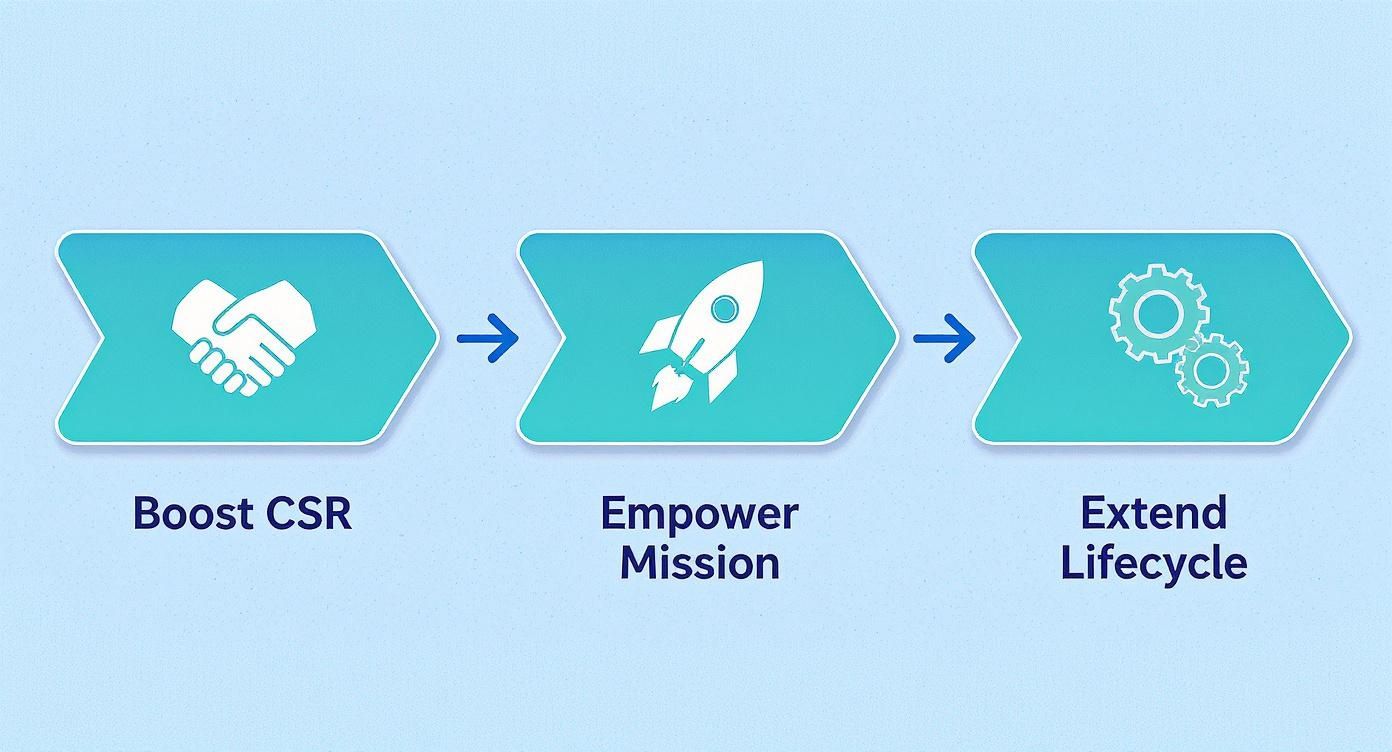
As the diagram shows, a secure computer donation for a nonprofit partner benefits everyone involved—the donor, the recipient, and our shared sustainability goals.
Following the Gold Standard: NIST 800-88
To eliminate risk and guarantee compliance, your process must align with established industry standards. In the United States, the most trusted and recognized framework is NIST 800-88, published by the National Institute of Standards and Technology. Think of it not as a single piece of software, but as the official rulebook for media sanitization.
NIST 800-88 outlines three main ways to make data unrecoverable:
- Clear: This method overwrites data with new binary data (ones and zeros), making the original information very difficult for a casual user to access. It’s generally fine for assets that will stay within your organization's control.
- Purge: A much more robust approach. It uses techniques like cryptographic erasure or degaussing to render data recovery infeasible, even with advanced laboratory equipment. This is the minimum standard you should accept for any equipment leaving your possession.
- Destroy: Exactly what it sounds like. This involves the physical destruction of the storage media by shredding, melting, or pulverizing it into tiny pieces. It offers the highest level of security and is the go-to for drives that held extremely sensitive information.
If you want to get into the technical weeds, our guide on how to wipe a computer hard drive breaks down what a truly compliant process looks like.
To help you get started, here is a practical checklist your team can follow to ensure every device is handled correctly.
Essential Data Sanitization Checklist for Donated Computers
This checklist provides a clear, step-by-step process for ensuring all corporate data is securely and permanently removed from IT assets before they are donated.
| Step | Action Required | Verification Method |
|---|---|---|
| 1. Asset Inventory | Log the serial number and asset tag of each device. | Cross-reference the physical asset with your inventory management system. |
| 2. Media Identification | Identify all data-bearing media (HDD, SSD, etc.) in the device. | Physical inspection of the asset; consult manufacturer specs if needed. |
| 3. Choose Method | Select the sanitization method (Purge or Destroy) based on data sensitivity. | Refer to internal data classification policy and NIST 800-88 guidelines. |
| 4. Execute Sanitization | Perform the chosen data destruction method using certified software or hardware. | Software logs from the wiping tool (e.g., Blancco, KillDisk). |
| 5. Verify Erasure | Attempt to access data on a sample of sanitized drives to confirm erasure. | Use forensic tools or sector-level verification to ensure no data remnants. |
| 6. Document Everything | Record the date, method used, and technician’s name for each serial number. | Generate and securely store a Certificate of Data Destruction. |
Following these steps methodically provides an auditable trail that proves due diligence, protecting your organization from liability.
The Role of an ITAD Partner
Managing a compliant data destruction process internally is a heavy lift for most businesses. It requires specialized tools, trained personnel, and significant time. This is why many organizations partner with a certified IT Asset Disposition (ITAD) vendor like Beyond Surplus. A professional partner takes on this burden and, crucially, the liability that comes with it.
From the moment your equipment leaves your office, a reputable ITAD partner provides a documented chain of custody.
By using a certified ITAD service, you receive a Certificate of Data Destruction for every single drive. This document is your auditable proof that you have met your legal obligations for data privacy, protecting your organization from potential fines and legal action down the road. It transforms a complex risk management task into a simple, verifiable step.
How to Find the Right Nonprofit Partner
A successful computer donation for nonprofit organizations really comes down to finding the right partner. A mismatched donation can quickly become a burden rather than a benefit. The goal is to find an organization whose mission your technology will genuinely accelerate.
The first step is to identify nonprofits whose work aligns with your company's values. Are you passionate about supporting education, community health, or maybe environmental causes? Getting clear on your focus will help you narrow down the field in a big way.
Vetting Potential Organizations
Once you have a shortlist, it's time to do some digging. This vetting process is absolutely critical for making sure your donation is impactful and handled responsibly. You’re not just giving away hardware; you're making a strategic contribution.
You have to confirm the organization is a legitimate, registered charity. Use well-known online resources like Charity Navigator, GuideStar, or even the IRS's own Tax Exempt Organization Search tool to verify their 501(c)(3) status. This documentation is non-negotiable for your own tax and compliance records down the road.
A key insight from our experience is that a nonprofit's 501(c)(3) status is just the starting point. The real work is in understanding their operational capacity. A small, grassroots organization might be doing incredible work, but they may lack the IT staff to manage, deploy, and maintain two dozen corporate desktops.
This verification step is crucial—both for your own due diligence and for ensuring any potential tax benefits are valid.
Asking the Right Questions
After you've confirmed an organization's legitimacy, the next step is to have a conversation. This is where you figure out if there's a true fit between what you have and what they actually need. It's so important not to assume. Instead, ask specific, operational questions.
A productive conversation will help you avoid the common pitfall of "tech dumping," which is when well-intentioned donations become an expensive disposal problem for the nonprofit. Your goal is to empower them, not saddle them with a logistical headache. We cover this topic in more detail in our article, A Complete Guide to Responsible IT Disposal and Donation.
To get a real sense of their technology needs, try asking questions like these:
- What are your current technology challenges? This open-ended question can reveal pain points you might be able to solve right away.
- Do you have dedicated IT staff or a volunteer who handles tech support? Understanding their support capacity is vital.
- What specific tasks or programs would these computers support? For example, will they be used for a public computer lab, for administrative work, or out in the field?
- Are there any specific software requirements or licenses we should know about?
- Can you handle the logistics of a pickup, or would you need our help with transportation?
By carefully selecting and vetting your partner, you transform a simple hardware handover into a meaningful partnership. You make sure your assets don't just find a new home—they find a new purpose.
Donated tech is so much more than just equipment. It's the engine that powers a nonprofit's mission, especially when every dollar in the budget is already stretched thin. A corporate computer donation can completely change the game for these organizations.
Picture a local food bank finally ditching paper logs for a real inventory database. Or think about an after-school program suddenly having the tools to teach kids critical digital literacy skills. These aren't just nice ideas; this is the real-world impact your used equipment can have, empowering nonprofits to work smarter and make a bigger difference.
Closing the Digital Divide for Nonprofits
The hard truth is that many nonprofits are running on fumes, technologically speaking. They're often stuck with ancient, unreliable systems that make it a struggle to manage donor lists, run fundraising campaigns, or even handle day-to-day administrative work. This "digital divide" holds them back and slows down their mission.
Your donation is a direct solution to this problem. When you provide capable desktops or laptops, you’re giving them the tools they need to get their work done efficiently. That means less time fighting with a frozen computer and more time dedicated to what actually matters—serving their community.
Technology as a Catalyst for Growth
The connection between technology and a nonprofit's success isn't just a hunch; it's backed by hard data. Recent studies have shown that nonprofits with a handle on their tech are far more likely to hit their goals. Yet, a shocking number of them are still playing catch-up. One report found that only 12% of nonprofits were considered "digitally mature."
You can dig deeper into this digital transformation journey in the nonprofit sector and see just how critical technology is to their success.
A computer donation isn't just a handout. It's an investment in a nonprofit's capacity to scale its mission, enhance its fundraising efforts, and ultimately, create a more resilient and effective organization for years to come.
By making a thoughtful computer donation for nonprofit partners, your business becomes a key player in this transformation. You're providing the foundational tools that allow these vital organizations not just to survive, but to thrive. It’s a powerful way to make sure your retired assets keep generating value long after they've left your books.
Managing Donation Logistics and Delivery
You’ve prepped your hardware and found the perfect nonprofit partner. But now for the final, and often overlooked, piece of the puzzle: getting the equipment from your facility to its new home. The logistics of moving IT gear are a critical step, ensuring everything arrives safely and securely.
For a handful of local machines, a business might be able to handle it in-house. This usually involves carefully packing the computers to avoid damage, then coordinating with the nonprofit for a drop-off or pickup. It's manageable, but the complexity—and risk—ramps up quickly with larger volumes or longer distances.

Leveraging a Professional ITAD Partner
This is exactly where a specialized IT Asset Disposition (ITAD) partner like Beyond Surplus becomes invaluable. An experienced partner takes the entire logistical process off your hands, removing the burden from both your team and the nonprofit. It ensures every step is handled correctly and professionally.
Partnering with an ITAD expert offers significant advantages for businesses:
- Secure Transportation: They use their own fleet or vetted logistics partners, guaranteeing secure transit from your loading dock to the destination.
- Professional Packing: They’ve got all the right gear—pallets, shrink wrap, and secure bins—to protect the assets and make handling a breeze.
- Flexible Scheduling: They work around your schedule to keep disruptions to your operations at a minimum.
A professional approach turns a potentially chaotic project into a smooth, predictable process. To see just how easy it can be, you can schedule a pickup or register for a drop-off with a certified provider.
The single most critical element a professional partner provides is a documented chain of custody. This isn't just paperwork; it’s the auditable proof that tracks every single asset from the moment it leaves your door to its final destination. It ensures complete accountability and, crucially, transfers liability away from your organization.
This documentation is essential for your internal inventory tracking, any compliance audits, and gives your finance team the formal proof of donation they need. It’s what solidifies the security and integrity of your entire donation program.
Maximizing Tax Benefits and Ensuring Compliance
Donating used computer equipment to a nonprofit is more than a CSR initiative—it can be a smart financial move for your business. But to realize those financial benefits, meticulous documentation and compliance are essential. Getting this right ensures your generosity is recognized by the IRS and reinforces your company’s diligence.
The cornerstone of any tax-deductible donation is the formal receipt you get from the nonprofit. This is a critical legal document that must be airtight to stand up to an audit.
Documenting Your Donation for the IRS
For your donation to count, the receipt from the 501(c)(3) organization has to include specific details. If any of these are missing, the IRS could disallow the deduction.
Here’s what that receipt absolutely must have:
- The nonprofit's full legal name and Employer Identification Number (EIN). This confirms their official tax-exempt status.
- A detailed description of what you donated. Don't just say "10 computers." Be specific: "10 Dell Latitude 5420 laptops with chargers."
- The date the donation was officially received. This locks in the tax year for your deduction.
- A statement confirming no goods or services were provided in exchange for the donation.
One of the trickiest parts is determining the fair market value (FMV) of used IT equipment. This is what a buyer would be willing to pay for the items in their current condition. You can determine this by researching recent sales of similar models or by consulting with an ITAD valuation expert. Be careful not to overstate the value, as that can bring on serious penalties. For a deeper dive into the financial side of things, it helps to review resources that clarify understanding tax regulations for donations.
Your internal records are just as important as the receipt from the nonprofit. Keep a detailed inventory that links each device's serial number to its determined FMV and its data destruction record. This creates an unbroken, auditable trail from start to finish.
When you pair this level of detailed record-keeping with a formal certificate of destruction for the hard drives, you’ve built a complete compliance package. It proves you’ve handled both data security and financial accounting properly, protecting your business from every angle.
Business leaders often have practical questions when considering a technology donation program. Getting clear on these points from the start makes the whole process smoother for everyone involved and helps sidestep any compliance or logistical hiccups down the road.
What About Software and Licenses?
A common question is whether to leave the operating system or other programs installed.
The answer is no. Most corporate software licenses are non-transferable. The best and safest approach is to perform a certified data wipe that removes absolutely everything, including the operating system. This gives the nonprofit a completely clean slate to install their own licensed software or free open-source alternatives.
Can We Donate Older or Specialized Gear?
Another frequent concern is whether older or highly specialized equipment is useful. While newer equipment is always welcome, many nonprofits can gain significant value from business-class desktops and laptops that are three to five years old, especially for basic administrative work.
When it comes to unique or proprietary hardware, it can sometimes be more of a burden than a gift unless the nonprofit has a very specific need for it. The best policy is always to ask them first.
This growing reliance on technology is a huge deal in the nonprofit world. The global market for nonprofit donation software was valued at $1.09 billion and is projected to climb to $2.51 billion by 2033. That's a clear signal of how essential digital tools have become for these organizations. You can dive deeper into these trends in nonprofit technology adoption to see the bigger picture.
Who Is Liable if Something Breaks?
Finally, what about liability? What happens if a donated computer stops working a week after you hand it over?
Once the donation is officially complete and you have the paperwork to prove it, the equipment is the nonprofit's property. As long as you've done your due diligence with a certified data wipe and have a clear donation agreement in place, your responsibility ends at the point of transfer.
When your company's surplus IT equipment needs a new home that is secure, compliant, and impactful, Beyond Surplus is here to manage the entire process for businesses. We handle everything from certified data destruction to logistics, ensuring your computer donation for nonprofit partners is a seamless and secure experience. Contact us today to learn more about our IT Asset Disposition solutions.