For any business in the United States, getting rid of old computers is more than a chore; it’s a critical process demanding a strategic plan. This guide is for IT managers and business owners needing to manage computer recycling in Atlanta, Georgia. The process must start with creating a detailed inventory of your IT assets and establishing a secure data destruction plan before any equipment leaves your premises. Once your business's data is secure, you can determine the best path forward—whether that’s reselling for a return on investment, donating for corporate social responsibility, or partnering with a certified e-waste recycler for secure IT asset disposal.
Starting Your Corporate Computer Recycling Plan
Before your business starts unplugging machines, it needs a solid strategy that prioritizes data security and compliance. This isn't just about clearing out a storage room; it's a crucial business function for commercial enterprises. A misstep in your IT equipment disposal process could lead to serious financial and reputational damage. The absolute first step is ensuring every last bit of sensitive corporate and customer information is permanently destroyed.
Once data security is handled, you can decide the fate of the hardware itself. Are you looking to recover value through resale? Do you have functional equipment that could benefit a nonprofit organization? Or is it time to engage a certified partner for secure electronics recycling services? Each option has distinct costs, compliance requirements, and impacts on your company's sustainability goals.
Create a Detailed Asset Inventory
To effectively manage your IT asset disposal project, you must first know exactly what you're dealing with. Creating a detailed inventory of your assets is non-negotiable for any business. It’s the only way to ensure accountability, track assets for financial records, and plan logistics for your computer recycling pickup. This list must be more than a simple headcount.
A proper IT asset inventory should track key details for every item:
- Asset Tag Number: Your internal ID for tracking the device.
- Serial Number: The manufacturer's unique identifier.
- Device Type: Specify if it is a laptop, desktop, server, or network switch.
- Brand and Model: Be specific, like "Dell Latitude 7420" or "HP ProLiant DL380 Gen10".
- Condition: Note whether the device is working, needs repair, or is non-functional.
- Location: Which department or office the asset is coming from.
This inventory serves as the backbone of your entire disposal project, enabling informed decisions and a clear chain of custody from start to finish.
Define Your Disposal Goals
With a complete inventory, your business can set clear goals. Is the primary objective to minimize disposal costs? Or is maximizing financial return the top priority? Perhaps your company wants to highlight its commitment to sustainability through responsible donation and recycling.
For most businesses, the optimal strategy is a combination of these goals. You might find that newer laptops still hold significant resale value, while older desktops are perfect for donation. Meanwhile, any broken or obsolete servers must be securely recycled. If giving back to the community is a priority, you can learn more about the benefits of a computer donation for nonprofit organizations and the proper way to execute it.
A decision matrix can be invaluable for mapping out this process, allowing you to weigh the pros and cons of each disposal path based on your specific business needs.
Computer Disposal Decision Matrix for Businesses
| Disposal Path | Best For | Key Consideration | Typical Business Scenario |
|---|---|---|---|
| Resale | Newer, high-value equipment (under 3 years old) | Maximizing financial return (ROI) | Refreshing employee laptops that are still in excellent, working condition. |
| Donation | Functional, but older equipment | Corporate Social Responsibility (CSR) & community impact | Clearing out desktops that are a few years old but still work perfectly well for a school or charity. |
| Certified Recycling | Obsolete, broken, or data-sensitive equipment | Data security & environmental compliance | Decommissioning old servers, broken monitors, and proprietary hardware that cannot be reused. |
This matrix is more than a checklist; it's a strategic tool. It helps align your IT equipment disposal with broader business objectives, whether that's boosting your bottom line, enhancing your brand reputation, or ensuring environmental compliance.
A well-defined ITAD (IT Asset Disposition) plan isn't an expense; it's a risk management strategy. It transforms a potential liability into a structured, compliant, and often value-positive business function.
Ultimately, proper planning is the foundation for a smooth and successful process. It acts as the blueprint for your entire computer recycling initiative, guiding every decision from the technical details of data destruction to the logistics of equipment pickup. A solid plan ensures nothing is missed and that your company's assets—and its reputation—are protected every step of the way.
Ensuring Total Data Destruction Before Disposal
Let's be blunt: the single biggest risk when a business disposes of an old computer is a data breach from a drive you thought was clean. Simply deleting files or performing a quick format is a common and dangerous mistake that leaves your company exposed. That "deleted" data is surprisingly easy to recover, creating a massive liability. For any business, such a breach can result in hefty fines, a damaged reputation, and a complete loss of customer trust.
That is why your business must implement a robust data sanitization process before any IT asset ever leaves your control. This is not just a best practice; it is a non-negotiable component of complying with numerous data privacy laws. The appropriate method depends on the sensitivity of your data and your industry's legal requirements.
Comparing Data Destruction Methods
Not all data destruction techniques offer the same level of security. In professional IT asset disposal, there are three core methods: software wiping, degaussing, and physical shredding. Each has a specific application and provides a different level of security for commercial equipment.
Software-Based Data Wiping: This method uses specialized software to overwrite every sector of a hard drive or solid-state drive (SSD) with random data. This is done in multiple "passes" to ensure the original information is completely unrecoverable. It is the ideal solution for devices intended for resale or reuse, as the drive remains functional.
Degaussing: Think of this as a targeted EMP for your storage media. Degaussing uses an extremely powerful magnetic field to destroy the data on traditional hard disk drives (HDDs) and magnetic tapes. The magnetic force scrambles the data at a fundamental level, rendering the drive unusable. This method does not work on SSDs, which do not rely on magnetic storage.
Physical Shredding: When data must be destroyed with absolute certainty, this is the definitive solution. The hard drive, SSD, or other media is fed into an industrial shredder that grinds it into small metal fragments. This is the most secure method to ensure data is irretrievably gone and is often the standard for devices containing highly sensitive or classified information.
The choice often depends on a simple question: does this equipment have any resale value? If yes, software wiping is the only viable option. If security is the absolute top priority and the drive is at its end of life, shredding is the gold standard for your business.
Which Destruction Method Is Right for Your Business?
Your approach to data destruction will be shaped by your company’s risk tolerance and regulatory landscape. A marketing agency retiring a few MacBooks has different needs than a financial firm decommissioning servers that processed customer financial data. That firm is bound by strict regulations like the FTC Disposal Rule, which mandates how consumer information must be protected.
Similarly, a healthcare provider must adhere to HIPAA, which demands that Protected Health Information (PHI) be rendered completely unreadable and impossible to reconstruct. In these high-stakes industries, physical destruction is often the only method that guarantees compliance. For official government guidelines, we highly recommend reviewing our guide on NIST SP 800-88 compliance, which sets the federal standard for media sanitization.
This flowchart can help you visualize the decision-making process for your old company computers.
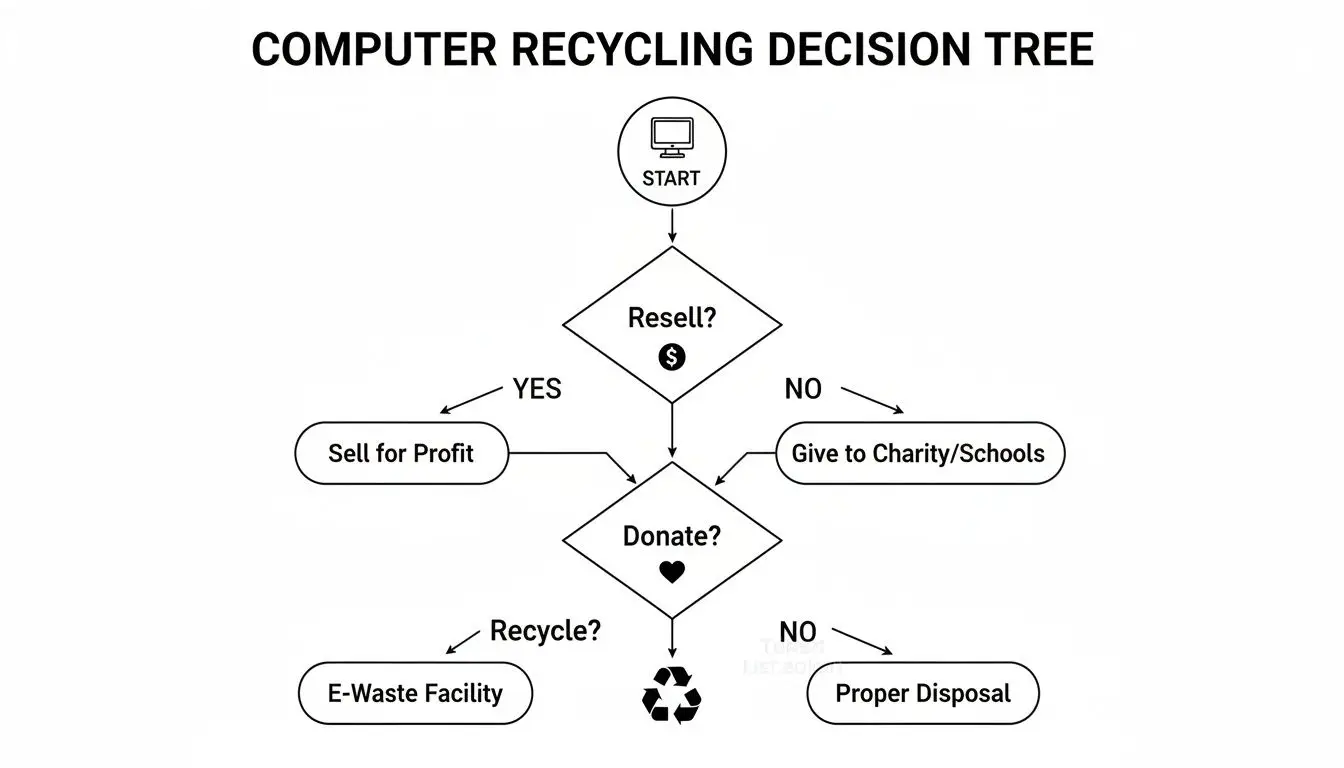
As you can see, your first move depends on whether you're trying to recover value (resale), fulfill corporate social responsibility (donation), or ensure total end-of-life security (recycling).
The Critical Role of Certification
Regardless of the method chosen, the entire process must be documented. A Certificate of Data Destruction is the official document that proves your company followed a secure and compliant process. This certificate is far more than a piece of paper—it’s your legal proof that you have transferred liability to your certified ITAD partner.
A Certificate of Data Destruction is your auditable proof of due diligence. It documents the serial numbers of the destroyed devices, the method used, the date of destruction, and the authorized vendor, protecting your business from future claims of non-compliance.
When vetting an ITAD provider, always confirm they provide serialized Certificates of Data Destruction. This documentation is your defense during an internal audit or regulatory review. Without it, you have no tangible evidence to prove you took responsible steps to prevent a data breach, leaving your organization exposed.
Choosing the Right Recycling Path for Your Business
Once your data has been securely destroyed, you are left with the physical hardware. For businesses, determining the most compliant way to dispose of old IT equipment is a complex decision. The right path depends on the volume of equipment, its condition, and your company's priorities regarding cost, security, and logistics.
While consumer-focused options exist, they are inadequate for commercial needs. A business retiring dozens or hundreds of computers requires a solution that covers liability, provides clear documentation, and handles all logistical challenges—services that retail programs are not designed to offer.
Manufacturer Take-Back and Mail-In Programs
Many large manufacturers, such as Apple and Dell, offer take-back or mail-in recycling programs. These may seem convenient if your company is retiring only one or two laptops. Typically, you get a prepaid shipping label online and send your old equipment back.
However, these programs have significant drawbacks for business-scale operations:
- Limited Scope: They often accept only their own branded products and may impose strict limits on the number of items you can send at once.
- Logistical Burden: Imagine your staff packing and shipping hundreds of individual computers. It is a logistical nightmare that consumes valuable employee time.
- Lack of Documentation: These services almost never provide the detailed, serialized Certificates of Recycling and Data Destruction that your business needs to prove compliance in an audit, leaving a major gap in your chain of custody.
These programs are designed for individuals, not the rigorous demands of enterprise IT asset disposal.
The Professional ITAD Partner Advantage
For any business dealing with more than a handful of old computers, partnering with a dedicated IT Asset Disposition (ITAD) company is the most strategic choice. A professional ITAD provider like Beyond Surplus manages the entire end-of-life process, offering businesses of all sizes a single, secure solution for electronics recycling and IT equipment disposal.
The advantages are clear:
- Scale and Efficiency: ITAD vendors are equipped to handle any volume, from a small office cleanout to a full data center decommissioning. They manage all logistics, including on-site packing and secure transportation.
- Compliance and Liability Transfer: Certified ITAD partners provide auditable documentation, including Certificates of Destruction and Recycling. This paperwork is your proof of due diligence and officially transfers liability for the equipment from your company to theirs.
- Data Security Assurance: Unlike a mail-in program, professional services can offer on-site physical hard drive shredding. This provides absolute certainty that your sensitive data is destroyed before it leaves your facility.
An ITAD partner acts as an extension of your IT and facilities teams, managing a complex and high-risk process so you can focus on your core business. To better understand this, learning more about what IT asset disposition entails can clarify its strategic value.
Unlocking Value Through Resale and Buyback Programs
It is important to remember that not all retired IT equipment is waste. Newer devices, especially those under three years old, often retain significant resale value. A comprehensive ITAD strategy should always include an assessment of this equipment for potential sale. Your initial procurement decisions, such as leasing vs. buying equipment, can also influence your disposal options and responsibilities.
A qualified ITAD partner can help you convert these assets into working capital through a buyback program. Here’s what you should expect:
- Fair Market Valuation: Your partner should provide a transparent and accurate assessment of your equipment's value based on its condition, model, and current market demand.
- Secure Data Wiping: Before any device is resold, it must undergo certified data wiping to NIST standards, securing your data while preserving the hardware for reuse.
- Revenue Sharing: The proceeds from the sale can be returned directly to your company or used to offset the costs of recycling older, non-functional equipment.
By integrating a buyback program, IT asset disposal transforms from a cost center into a potential revenue stream. This approach not only maximizes your return on investment but also supports a circular economy by extending the life of functional technology.
Why Responsible Recycling Is a Business Imperative
Viewing computer recycling as just another task is a major oversight. For any modern business, how you manage old electronics is a critical component of risk management, brand protection, and corporate responsibility.
Getting it wrong exposes your company to significant legal, financial, and reputational harm.
The discussion must begin with the scale of the problem. Electronic waste, or e-waste, is one of the fastest-growing waste streams globally. This is not a distant issue; every server, laptop, and monitor your company retires contributes directly to it. Sending old hardware to a landfill is no longer an option, either ethically or legally.
The Global E-Waste Crisis: A Business Perspective
The statistics surrounding e-waste are alarming and should command the attention of any business leader. This is not just an environmental headline; it is a direct consequence of the technology lifecycles that power our businesses.
When old IT assets are improperly discarded, they can leak toxic materials like lead, mercury, and cadmium into soil and groundwater, causing long-lasting ecological damage.
This environmental impact is now firmly on the radar of regulators, investors, and your customers. How a company manages its e-waste is increasingly seen as a direct reflection of its commitment to sustainability. Understanding and reporting on your environmental footprint is becoming a standard business practice. For those looking to stay ahead of this trend, resources explaining Why Carbon Accounting Matters for Your Business Now offer valuable insight into the bigger picture.
A documented, responsible recycling program demonstrates that your business is part of the solution, not the problem.
Beyond Environmental Concerns: Brand Protection and Data Security
While environmental protection is a powerful motivator, the risks that hit closest to home for most businesses are data security and brand reputation.
What happens if a company hard drive—one you thought was disposed of—appears in a landfill or on a secondary market with sensitive data still intact? The fallout can be catastrophic.
This is not a hypothetical scenario. It is a real-world risk with severe consequences:
- Legal Penalties: Failure to comply with regulations like the FTC Disposal Rule, HIPAA, or GDPR can lead to crippling fines.
- Reputational Damage: A public data breach shatters customer trust, which can take years to rebuild, if ever.
- Financial Loss: The direct costs of a breach—including remediation, legal fees, and customer notifications—can be devastating.
This is where the business case for responsible computer recycling becomes clear. Partnering with a certified ITAD provider is not just about "being green"; it is a strategic move to shield your organization from tangible threats.
The Strategic Value of Certified ITAD
Choosing a certified recycler is the single most effective action your business can take to mitigate these risks. It establishes a formal, defensible process with an auditable trail to prove you acted responsibly.
A certified partner guarantees your assets are handled according to the highest industry standards for both environmental safety and data security.
The scale of mismanaged e-waste is staggering. In 2022, the world generated 62 million tonnes of e-waste, yet only 22.3% was properly collected and recycled. This leaves a massive volume of electronics, and the data they contain, unaccounted for, posing a direct and growing threat to businesses without a formal disposal plan.
Working with a certified recycler like Beyond Surplus effectively transfers the liability for your old IT assets. With a documented chain of custody and Certificates of Destruction, you have irrefutable proof that you have fulfilled your due diligence, protecting your brand from the legal and reputational fallout of improper disposal. This transforms a potential weakness into a documented strength in your compliance framework.
Managing the Logistics and Costs of E-Waste Disposal
Facing a room filled with hundreds of old computers can be daunting. For any business, coordinating the pickup and removal of this equipment is a significant logistical challenge. Proper management of the practical aspects—from site preparation to understanding costs—is what differentiates a smooth project from a major operational disruption.
The real work begins long before the pickup truck arrives. A successful pickup depends on your team's preparation. This includes having a detailed inventory list ready, consolidating all devices in a secure and accessible area, and assigning a point person to coordinate with the pickup team on the day of service.
Handling this planning upfront avoids last-minute scrambling and ensures our team can operate efficiently and securely, minimizing on-site time.
Preparing Your Site for Pickup
A well-organized staging area is the most critical factor for a smooth pickup. You should gather all assets—desktops, servers, laptops, and peripherals—in one location, preferably near a loading dock or another easily accessible exit. This is also the ideal time to review your inventory list and physically verify it against the collected equipment.
Here are key steps to prepare your site:
- Asset Tagging and Inventory: Ensure every device has an asset tag that matches your inventory spreadsheet. This is crucial for maintaining a clean chain of custody.
- Consolidation: Bring all equipment to a single, secure area. This simple step prevents technicians from needing to roam your facility to collect items, saving time and enhancing security.
- Day-of Coordination: Appoint one person from your team who is fully briefed on the project. They will be the main point of contact to direct the crew, answer questions, and sign the bill of lading.
This level of preparation allows our team to work quickly and professionally, adhering to your schedule and security protocols.
Demystifying Disposal and Recycling Costs
The cost of corporate computer recycling is not a flat fee. Several factors influence the final price, and understanding them will help your business budget accurately and avoid surprises. The cost is typically based on the specific services your business requires.
Key factors that influence cost include:
- Location and Logistics: The travel distance from our facility and the complexity of the pickup (e.g., navigating multiple floors or a high-security data center) can affect transportation costs.
- Volume and Weight: Many recyclers charge by the pound or by the pallet. Generally, the larger the volume of equipment, the lower the cost per pound.
- On-Site Services: If your business requires specialized services like on-site hard drive shredding, this will add to the total cost. However, it also provides the highest level of data security.
For businesses that require undeniable proof of data destruction before assets leave the premises, the additional investment in on-site services is a valuable security measure. You can explore our guide for a full breakdown of the typical hard drive shredding cost and its components.
The demand for secure and responsible recycling services is growing rapidly. The global computer recycling market, valued at USD 13,634.26 million in 2025, is projected to reach USD 22,981.53 million by 2033, growing at a CAGR of 6.74%. This growth is a direct response to the massive volumes of e-waste generated worldwide.
Turning Expense into Revenue with Value Recovery
A modern ITAD strategy does not have to be solely an expense. Many retired IT assets, particularly those less than three years old, still hold significant market value. A professional ITAD partner can help your business unlock that value through a buyback program.
This approach can turn what would have been a disposal fee into a revenue-neutral or even profitable project. By reselling functional equipment after it has undergone certified data wiping, your business can achieve a financial return on its old hardware.
The revenue generated from an IT buyback program can directly offset—or even completely cover—the costs associated with recycling older, non-functional equipment. This strategic approach makes responsible ITAD financially smart and sustainable.
A reputable partner will manage the entire process, from evaluating your assets and arranging secure transport to performing certified data sanitization and remarketing the equipment. This frees up your team to focus on core responsibilities while we handle the end-of-life process, ensuring you receive maximum value while remaining fully compliant.
Selecting a Certified ITAD Partner You Can Trust
When your company needs to recycle old computers, the partner you choose is the most critical decision in the entire process. Not all electronics recyclers are equal, and entrusting your assets to the wrong one can expose your business to significant financial, legal, and reputational risks. It is equivalent to giving away your company’s sensitive data with no guarantee of protection.
A trustworthy ITAD partner is transparent and can substantiate their security claims. This is where industry certifications serve as your best tool, acting as an independent guarantee that the vendor meets the highest standards.
The Importance of R2 and RIOS Certifications
As you evaluate potential partners for corporate computer recycling, two certifications should be non-negotiable: R2 (Responsible Recycling) and RIOS (Recycling Industry Operating Standards). These are the gold standards for the ITAD industry.
- R2 Certification: This standard focuses on electronics recycling, establishing strict requirements for data security, environmental protection, and worker health and safety. An R2-certified recycler is audited to confirm they have a secure data destruction process and a vetted downstream, tracking where every material goes.
- RIOS Certification: This is an integrated quality, environmental, health, and safety management system, similar to ISO standards but tailored for the recycling industry. A facility holding both R2 and RIOS certifications demonstrates a profound commitment to operational excellence and risk management.
These certifications are not just logos on a website; they are your proof that a partner has documented, auditable processes. You can learn more about what R2 certification means and why it is so critical for your business's security.
Questions to Ask Any Potential Vendor
Before signing any contract, you must ask pointed questions that go beyond pricing. A vendor's responses will reveal their professionalism and the security of their operations.
Here are key questions to start with:
- Can you provide a documented chain of custody from pickup to final disposition?
- Are you R2/RIOS certified, and can I see your current certificate?
- How do you audit your downstream vendors to ensure they meet the same high standards?
- What are your insurance liability limits for data breaches or environmental incidents?
A legitimate partner will provide clear, confident answers to each of these. Evasiveness, defensiveness, or an inability to produce documentation should be considered a major red flag.
The Power of Proper Documentation
Ultimately, your protection relies on paperwork. Certificates of Recycling and Data Destruction are your official proof of due diligence for auditors, stakeholders, and regulators. These documents formally transfer liability from your organization to the ITAD vendor. They should always be detailed, serialized, and clearly state the methods used.
A Certificate of Destruction isn't just a receipt—it's your legal shield. It proves you took responsible, documented steps to protect your data and dispose of assets in an environmentally compliant manner, closing the loop on your IT asset lifecycle.
The global e-waste crisis highlights the need for professional oversight. While Europe leads with a 42.8% formal recycling rate, the U.S. falls behind at just 15%. This gap creates significant risk for businesses but also presents an opportunity to lead by example. Working with a certified expert like Beyond Surplus ensures your old computers are handled through a secure, zero-landfill process, transforming a disposal problem into a demonstration of corporate responsibility. Contact Beyond Surplus for certified electronics recycling and secure IT asset disposal.