The message usually arrives with almost no warning. A lease decision is finalized, leadership sets a date, and the IT or facilities lead suddenly owns a project that touches every desk, every network drop, every copier, every badge reader, and every retired hard drive in the building.
That’s why movers office relocation planning can’t be treated like a packing exercise. It’s an operations project with security, compliance, uptime, and budget consequences. Teams that do it well build the move around the critical path: facilities readiness, vendor control, IT sequencing, and documented handling of anything that stores data.
Your Office Relocation Playbook Starts Here
Office moves happen often enough that the market has become highly structured. The global office relocation services market was valued at US$ 10.6 billion in 2022 and is projected to reach US$ 14.6 billion by 2032, while North America holds a 42% market share, according to Fact.MR’s office relocation services market report. That scale tells you something important. Companies relocate for practical reasons, but repeatable execution still separates a controlled move from an expensive one.

Most internal move plans start too late and focus too narrowly on furniture. The better approach starts with the new site. Confirm power, cabling pathways, access rules, loading dock constraints, elevator reservations, and the work required before occupancy. If construction or reconfiguration is involved, a practical primer on your tenant improvements resource helps frame what must be finished before the first workstation arrives.
What belongs on the critical path
The move succeeds when a few decisions happen early:
- Space readiness first: Don’t schedule movers until access, power, connectivity, and punch-list work are confirmed.
- Asset decisions early: Separate what will move from what will be retired, sold, recycled, or destroyed.
- Ownership by function: Facilities, IT, HR, finance, security, and department leads need named responsibilities.
- Cleanout planning: Large offices usually need a coordinated removal stream for furniture, peripherals, and obsolete equipment. Teams often pair the relocation plan with office cleanout services so the old site doesn’t become a last-minute disposal problem.
Practical rule: If an item has power, data, or compliance implications, it should never be handled as “miscellaneous.”
What works and what doesn’t
What works is a phase-based plan with approvals, inventories, and handoffs documented in writing. What fails is relying on tribal knowledge, hallway conversations, and a moving company to “figure it out on site.”
The fastest way to lose control is to let every department pack its own technology without standards. The second fastest is to ignore retired assets until move week. By then, every bad option gets more expensive.
The Pre-Move Blueprint Timeline and Team Assembly
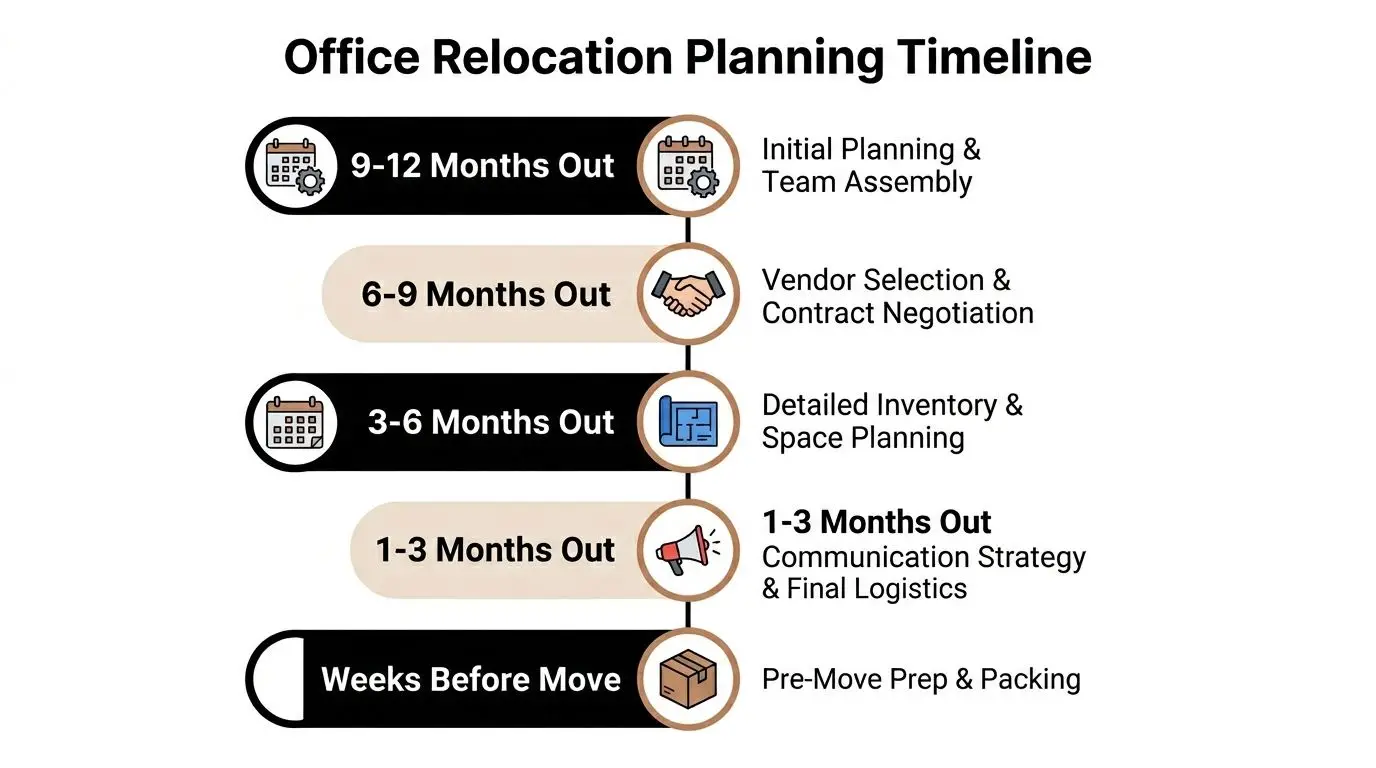
The schedule has to match the size of the organization. According to this office relocation guide from Bridges, small offices with 10 to 25 employees need 3 to 4 months, medium offices with 50 to 100 employees need 6 months, and large enterprises with 100 or more employees need 9 to 12 months to coordinate logistics, IT infrastructure, and vendors properly.
Build the move committee before you build the checklist
One person can sponsor the move, but no one person can run it alone. The most reliable structure is a small committee with direct authority:
- Facilities lead: building access, floor plans, dock scheduling, furniture, signage, permits
- IT lead: inventory, backup validation, network cutover, telecom coordination, device handling
- HR or internal communications: employee notices, seating assignments, move-day expectations
- Finance or procurement: contracts, change orders, invoice control, insurance verification
- Security or compliance: access control, records handling, data-bearing devices, chain of custody
A move committee also cuts down on slow approvals. When decisions sit in email threads, the timeline slips unnoticed.
A usable timeline has milestones, not intentions
A good plan should show dates for lease-related access, construction completion, internet installation, furniture delivery, labeling deadlines, mover walkthroughs, and decommissioning windows. If a task has no owner and no due date, it isn’t really planned.
I prefer a weekly review with one master tracker and one risks log. The risks log should name the issue, owner, current status, and trigger point for escalation. That forces the team to deal with problems while options still exist.
Don’t let “we’re waiting on confirmation” sit unresolved for weeks. In office moves, waiting is usually a hidden decision to accept more risk later.
Early choices affect employee readiness
Office layout decisions also shape the move more than teams expect. Storage, workstation sizes, conference room density, and shared desk design all affect the amount of equipment that moves. If the new space is tighter, resources on ergonomic furniture for small offices can help teams avoid buying furniture that looks efficient on paper but creates daily frustration in practice.
A simple planning table keeps the committee grounded:
| Phase | Main question | Owner |
|---|---|---|
| Early planning | Is the new space actually ready for occupancy work? | Facilities |
| Vendor selection | Who handles moving, cabling, telecom, and retired assets? | Procurement |
| Inventory review | What moves, what stays, what gets removed? | IT and department leads |
| Employee prep | Does everyone know what to pack, label, and leave alone? | HR and managers |
| Final readiness | Can the business operate on day one? | Move committee |
Selecting and Managing Your Relocation Partners
The plan can be strong and still fail if the wrong vendors show up. Commercial movers need to do more than lift and load. They need to follow chain-of-command, protect high-value equipment, respect building rules, and work alongside cabling teams, electricians, and technology staff without creating chaos.

That’s why vendor selection deserves the same scrutiny as the timeline. Crown Workspace notes that poor vendor vetting contributes to failure in 25% of projects, and computers and copiers are mishandled in 18% of moves. Those numbers line up with what operations teams already know. Generic moving experience doesn’t equal commercial relocation discipline.
What to test during mover interviews
Ask direct questions. If a mover answers vaguely now, they’ll improvise later.
- Commercial experience: Have they handled occupied office floors, after-hours moves, and multi-vendor coordination?
- Technology handling: Can they move servers, copiers, trading desks, lab-adjacent equipment, and other sensitive devices under written instructions?
- Insurance and building compliance: Will they provide COI documents, adhere to dock windows, and meet property management rules?
- Label discipline: Can they work from your numbering system rather than their own ad hoc tags?
- Escalation: Who is the on-site decision-maker when placements, access, or asset counts don’t match?
A practical screening tool helps. Procurement teams that want a structured review process can adapt a vendor due diligence checklist to compare movers, cabling contractors, and downstream asset-handling vendors on the same criteria.
The contract should remove ambiguity
The statement of work should define more than dates and truck counts. It should specify packing responsibility, labeling standards, floor protection, disconnect and reconnect boundaries, specialty handling, debris removal, and what happens if equipment can’t be placed because the destination isn’t ready.
The mover’s job ends where your contract says it ends. If the language is loose, the disputes start on move day.
The strongest mover relationship is tightly managed but not adversarial. Give them the floor plan, seat map, tagging system, loading sequence, and contact tree early. Then confirm all of it again during the final walkthrough. Good movers perform better when they inherit a precise playbook, not a pile of assumptions.
The IT Relocation Master Plan Decommissioning to Deployment
Facilities teams can absorb a late chair delivery. The business usually can’t absorb a failed network cutover, missing firewall, or undocumented hard drive. IT needs its own move plan, running in parallel with the broader relocation schedule.
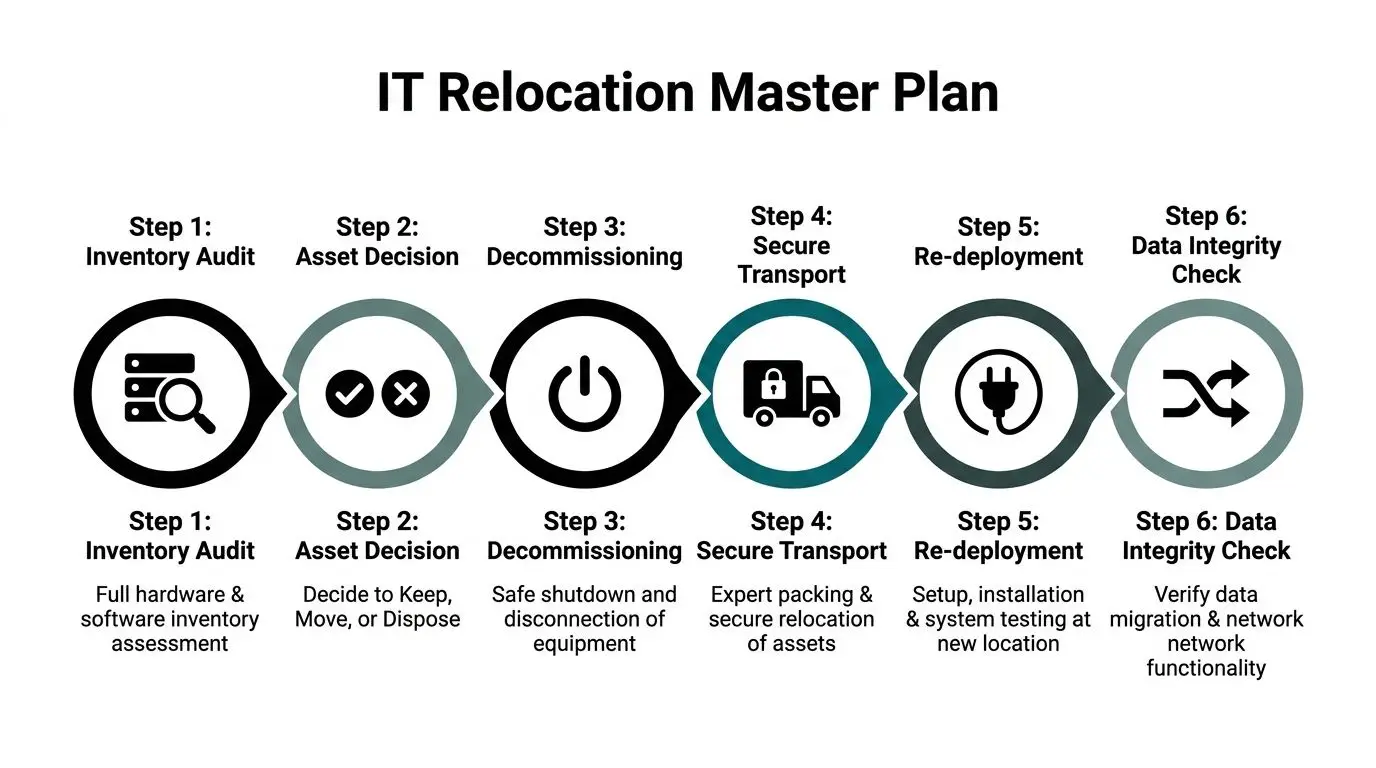
A common mistake is treating all devices the same. They aren’t. Some assets are easy to reconnect. Others have licensing ties, static dependencies, rack relationships, or compliance implications that make even a short outage difficult to reverse.
Start with the inventory that operations actually needs
The inventory shouldn’t be just an accounting export. It should identify:
- Production equipment: servers, switches, firewalls, storage, UPS units, conference room systems
- Endpoint fleet: laptops, desktops, thin clients, monitors, docking stations, printers
- Business dependencies: owner, department, application dependency, move priority
- Disposition status: move, redeploy, hold, wipe, shred, recycle, sell
- Destination details: new room, rack, floor, desk, closet, or storage area
That inventory creates the move sequence. Without it, teardown becomes guesswork.
Separate telecom cutover from physical moving
Internet and voice services fail when teams assume they’re tied to the moving truck schedule. They aren’t. Carrier provisioning, building demarc access, firewall staging, and test calls need their own clock. Even though it’s written for another market, this article on VoIP solutions for Australian businesses is a useful operational reminder that communications continuity depends on cutover planning, not last-minute line transfers.
For larger environments, the physical move may also overlap with rack de-install, cable labeling, and staged redeployment. Organizations facing server room shutdowns or infrastructure exits often pair the move with data center decommissioning so teardown, removal, and chain-of-custody controls are managed under one process.
Disposal risk belongs in the IT plan
Most moving checklists talk about packing monitors and labeling cords. They rarely address what happens to retired devices. That omission is dangerous. A 2023 Gartner report highlighted that 30% of data breaches stem from improper disposal of IT equipment during events like office relocations, as cited in 495 Movers’ office moving FAQ.
That single point changes how IT should operate during a move. Retired laptops, old storage arrays, copiers with drives, failed backup media, and decommissioned access-control hardware all need a defined handling path before move day begins.
A practical move-week IT sequence
The most dependable sequence looks like this:
- Freeze changes on systems likely to be affected by the move.
- Validate backups and confirm restore procedures for critical systems.
- Tag and photograph racks, patching, workstation setups, and specialty equipment.
- Shut down in order based on dependency, not convenience.
- Pack by function so reconnect teams aren’t hunting for components.
- Test at destination in a preset order, starting with core network and authentication.
- Reconcile exceptions immediately, while the right vendors are still on site.
Protecting uptime during movers office relocation isn’t about moving faster. It’s about reducing the number of unknowns before anything gets unplugged.
Secure Asset Disposition and Data Destruction
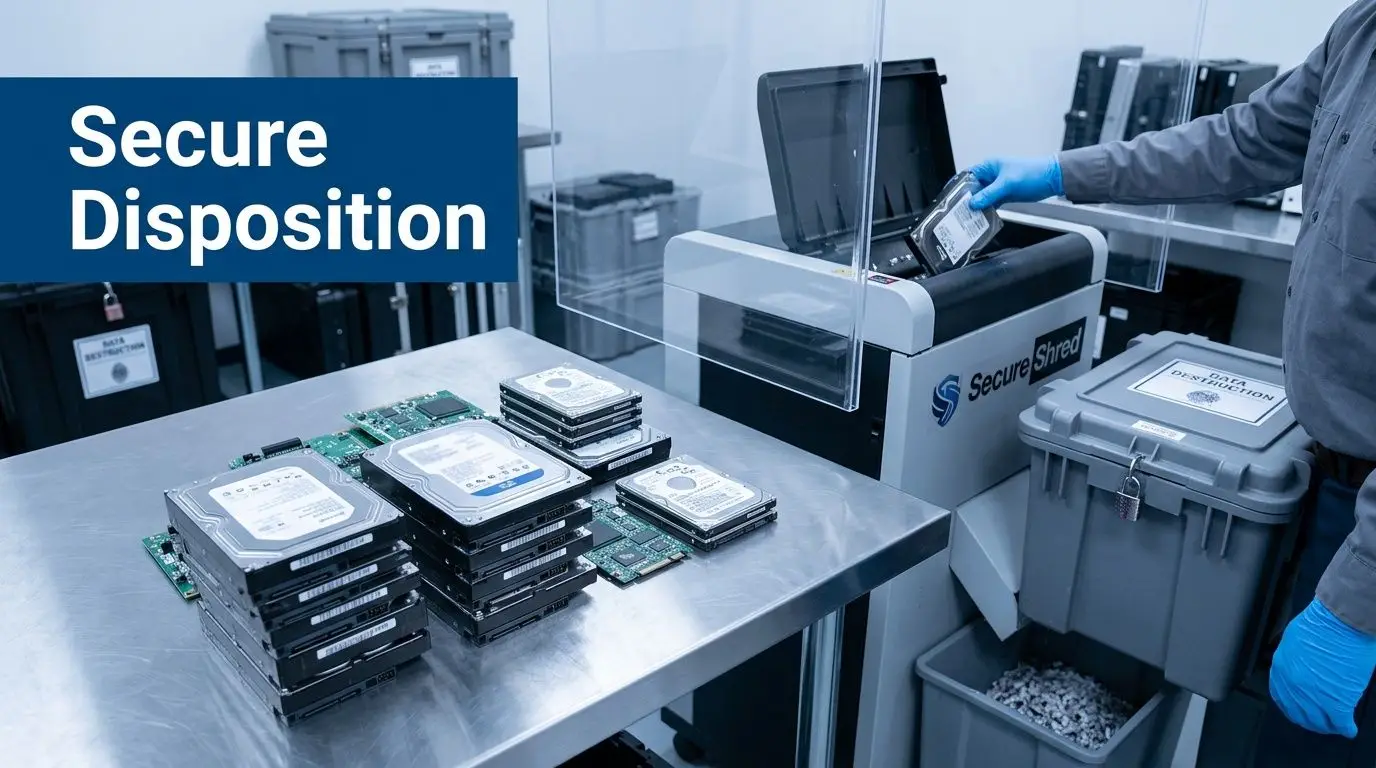
The move creates a rare opportunity to clean up years of accumulated technology. Old desktops in storage rooms, printers nobody owns, backup devices from a past refresh, conference room gear replaced but never removed. If that material leaves the building without a documented process, the company keeps the risk even after the assets are gone.
Decide the disposition path before move weekend
Every retired asset should be assigned to one of four paths:
| Asset condition | Best path | Main concern |
|---|---|---|
| Reusable and current | redeploy or resale | preserving value |
| Obsolete but data-bearing | certified wiping or shredding | data exposure |
| Broken electronics | recycling | environmental handling |
| Branded or regulated material | product destruction | legal and reputational control |
Many office moves regain budget discipline at this point. Instead of paying to move junk twice, the team removes it from scope. Instead of paying for ad hoc disposal after occupancy, they close out the old site with documentation.
Wiping and shredding solve different problems
Certified data wiping fits devices that still have reuse value and can be processed under a controlled standard. Physical shredding fits media that can’t be trusted for reuse, or assets governed by stricter internal policy. The right choice depends on risk tolerance, device type, and whether the organization wants recovery value from the hardware.
What matters most is documentation. If a vendor can’t provide chain-of-custody records and certificates, the disposal may be operationally convenient but legally weak.
A hard drive leaving the office without a documented handoff is not “gone.” It is still your problem.
One option organizations use is data destruction services near me, which can support wiping, shredding, and the paperwork needed to document transfer of custody and final disposition. That matters in healthcare, finance, legal, education, and any environment where retired equipment still holds regulated or confidential data.
Treat surplus equipment as a budget line, not a junk pile
Retired laptops, servers, networking gear, and mobile devices may still hold residual value. When the disposition process includes testing, serialization, and recovery reporting, the move budget becomes easier to defend because disposal is no longer just a cost center.
Teams get into trouble when they mix recoverable equipment with scrap, or when departments remove items informally before central review. Keep all disposition under one approval path. If finance, IT, and facilities can see what left the building and why, there’s far less friction at closeout.
A disciplined ITAD process also simplifies lease-end conditions. Emptying the old space is one task. Proving that electronics were handled responsibly is another. You need both.
Execution Audit and Final Asset Recovery
Move weekend is where planning gets tested in real time. Trucks arrive early, building engineers change access rules, a department lead wants one more file cabinet moved, and somebody discovers a storage closet full of old monitors that never made the inventory. None of that is unusual. What matters is how tightly the team responds.
The broad moving environment is massive. In 2023, nearly 41 million Americans moved, with about 7.7 million undertaking interstate relocations, according to MoveBuddha’s moving industry statistics. A meaningful share is tied to job transfers and corporate needs, which is one reason office moves so often produce large volumes of surplus equipment that need formal disposition rather than last-minute hauling.
What the on-site lead should watch
The best on-site leads don’t carry boxes. They control the flow.
They verify elevator timing, loading order, label compliance, floor protection, and destination placement. They keep the move crew, IT team, and building contacts aligned. They also keep unauthorized “help” from derailing the sequence. When employees start carrying untagged items to the wrong floor, the count breaks immediately.
A strong move-day checklist usually includes:
- Dock control: confirm arrival windows and truck sequence
- Asset verification: stop any untagged or mismarked technology from loading
- Floor plan policing: place items where the plan says they go, not where someone points in the moment
- Exception logging: record damage, missing items, or blocked rooms as they happen
- Old-site sweep: inspect server closets, storage rooms, print areas, and reception cabinets before signoff
The first audit happens before everyone goes home
Once the destination is physically loaded, start the operational audit. Confirm internet service, core network, identity systems, phones, printers, conference rooms, and priority departments. Then compare the delivered inventory to the pre-move list.
The old site needs a separate final pass. That includes overlooked electronics, access cards, loose drives, and any assets set aside for recovery. If retired equipment remains, it should move into a documented recovery stream such as asset recovery services in Georgia rather than sitting in a half-empty office for weeks.
Closing the old office without a final reconciliation is how assets disappear, invoices grow, and compliance documents get lost.
Close the project with paperwork, not assumptions
The last phase is administrative, but it protects the result. Reconcile vendor invoices against the actual scope delivered. Match damage claims to exception logs. Collect certificates, pickup records, recycling documents, and any value-recovery reporting tied to retired equipment.
Then hold a short after-action review. Capture what failed, what surprised the team, and what should change next time. Most organizations move infrequently enough that memory fades. Written lessons don’t.
Contact Beyond Surplus for certified electronics recycling, secure IT asset disposition, data destruction, and office move support that helps your team control risk, document asset handling, and recover value from retired equipment.