Your lease end date is set. Department heads are asking about seating charts. Facilities is focused on furniture, signage, and keys. IT is staring at a different problem entirely: servers, switches, endpoints, backup devices, retired laptops, and whatever is still sitting in that storage room with customer data on it.
That’s why office relocation services need to be evaluated as more than trucks and labor. A business move is a chain of decisions about uptime, asset control, and data risk. If the move plan treats your technology like desks on wheels, the problems usually appear after move day, when users can’t connect, old devices are unaccounted for, or compliance questions start landing on someone’s desk.
Planning Your Next Business Move
An office move feels operational until it starts touching systems your business can't run without. Furniture can arrive late and you can still open. If critical devices, network gear, or data-bearing assets are mishandled, the disruption is harder to contain.

The scale of this isn’t small. Corporate headquarters relocations in the U.S. reached a seven-year peak with 593 public companies moving between March 2022 and March 2023, a 29% rise from the previous year, and 2–5% of U.S. businesses undertake office relocations annually, generating over 35% of the moving industry's revenue due to complexity. Those numbers matter because they show how often organizations face this exact challenge, and why specialized handling has become standard rather than optional.
What managers usually underestimate
The common mistake is assuming the move is one project. It’s really several projects running at once:
- Facilities work: floor plans, furniture sequencing, access control, loading docks
- IT cutover: disconnects, transport, rack placement, cable maps, testing
- Disposition work: retired hardware, storage media, and obsolete electronics
- People change management: timing, labeling, communications, temporary workflows
A capable relocation plan also needs a path for items that aren’t making the trip. That’s where services like office cleanout coordination become useful, especially when you’re separating reusable assets from obsolete equipment and scrap.
Practical rule: If your move checklist has twenty lines for furniture and one line for IT, the plan is incomplete.
Space decisions affect technology decisions
Layout planning also affects your move more than many teams expect. In healthcare and other regulated environments, room function, privacy, equipment placement, and workflow are tightly connected. Teams redesigning clinical or administrative environments often benefit from outside planning references such as effective medical office design, because space planning choices often determine cabling routes, device locations, and what can be safely decommissioned before move day.
Good office relocation services help you think like a project manager. They force asset decisions early, define handoffs clearly, and separate what is moving from what must be wiped, destroyed, resold, recycled, or stored.
Beyond Boxes and Trucks A Full Scope of Services
A serious relocation partner does more than load a truck. The job starts well before move day and continues through setup, testing, cleanup, and disposition.
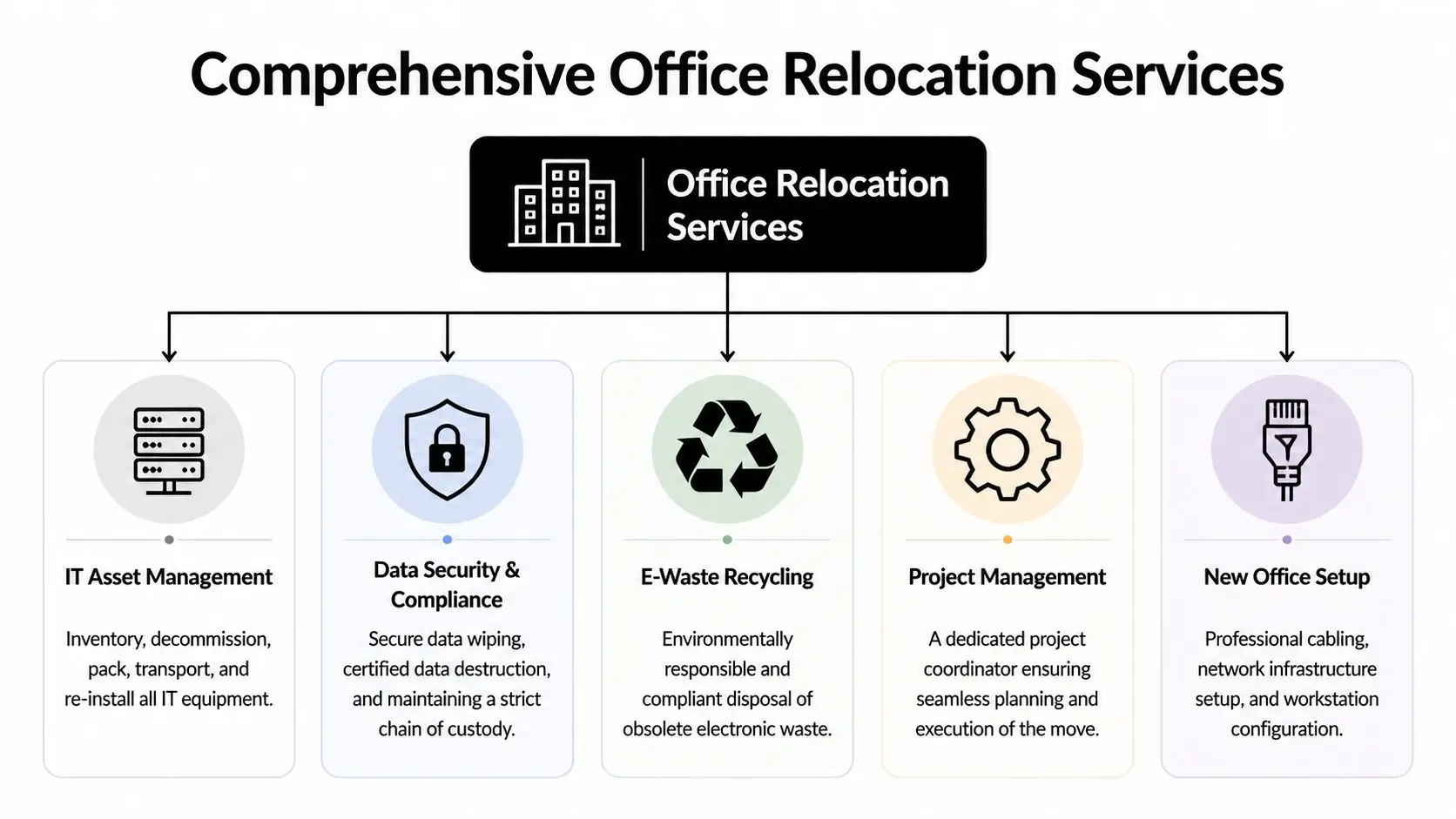
What comprehensive office relocation services include
The strongest vendors usually cover five operating lanes.
| Service area | What it should include |
|---|---|
| Project management | Timeline ownership, site coordination, vendor scheduling, issue tracking |
| Physical relocation | Packing, labeling, transport, staging, furniture install |
| IT handling | Device inventory, disconnects, anti-static packing, rack moves, reconnects |
| Asset disposition | Segregation of retired equipment, secure removal, recycling, value recovery |
| New site readiness | Cabling, workstation setup, network verification, punch-list support |
That mix is why a general mover and a business relocation provider aren’t the same thing. One moves contents. The other manages operational continuity.
The difference between standard movers and relocation specialists
Standard movers are often fine for desks, chairs, and boxed records. They usually struggle when the scope expands into serialized IT assets, chain-of-custody expectations, or phased occupancy.
Look for these signs of full-service capability:
- Dedicated coordination: one person owns schedule conflicts, access windows, and vendor communication
- Technical handling: servers, network gear, and device carts are packed and staged differently from furniture
- Disposition workflows: retired assets are identified before move week, not discovered during loading
- New-site setup support: cabling and workstation deployment are built into the project plan
A white-glove approach matters most when equipment is sensitive, high value, or dispersed across departments. That’s why many organizations use white glove relocation support when they need tighter handling procedures for IT and specialty equipment.
Office relocation services are most effective when every asset has one of four statuses before the first truck arrives: move, store, dispose, or hold.
What a real statement of work should cover
Ask vendors to define exactly who does each step. Disconnecting printers isn’t the same as removing firewalled appliances. Packing monitors isn’t the same as documenting serialized storage media. Reconnecting users isn’t the same as validating line-of-business applications.
A complete scope should address:
- sequencing by department or floor
- after-hours or weekend windows
- packing standards for electronics
- destination labeling tied to floor plans
- decommission handling for obsolete equipment
- testing responsibilities at the new office
When that scope is vague, the budget usually gets vague too.
Why Your IT Infrastructure is the Most Critical Asset
A damaged conference table is annoying. A misplaced hard drive is a legal, operational, and reputational problem.

That’s the blind spot in many office moves. Most office moving content fails to address critical ITAD topics like certified data destruction, chain-of-custody for compliance such as HIPAA and SOC 2, and secure decommissioning of legacy equipment. That gap creates a major blind spot and liability for regulated industries during a move.
Why furniture logic fails with technology
Teams often apply the same logic to all office contents: label it, move it, place it. That works for non-sensitive items. It fails with technology because devices don’t just have physical value. They hold credentials, customer information, internal records, licenses, and configuration dependencies.
A few common failure points show up repeatedly:
- Legacy gear gets ignored: old desktops, backup appliances, and phones stay in closets until move week
- Ownership is unclear: facilities assumes IT has approved removal, while IT assumes facilities is only moving furniture
- Sensitive media rides with general freight: no separate controls, no documentation, no exception handling
- Reconnect priorities are wrong: executive offices get set first while revenue or support systems wait
Downtime usually starts before the truck leaves
The risk isn’t only what happens in transit. Downtime often starts when teams disconnect equipment without understanding dependencies. A site can physically move in one day and remain functionally impaired for much longer because nobody mapped what had to come down first and what had to come up first.
Treat every server, firewall, switch stack, and storage device as both an operational asset and a compliance asset.
That’s also why localized support matters during endpoint transitions. For one-user or small-team migrations, examples such as data transfer services in Edmonton show the practical side of preserving user data and workstation continuity. At enterprise scale, the principle is the same. Data and configuration transfer can't be left to improvised packing decisions.
The biggest hidden risk is retired equipment
The most dangerous asset in a relocation is often the one you’ve already decided not to keep. Once a device is “old,” people stop treating it like a live risk. That’s exactly when mistakes happen.
Old laptops, NAS units, copiers with storage, lab equipment with embedded drives, and decommissioned servers need their own controlled removal path. If they’re stacked for later, they become easy to lose and hard to document. For organizations with audit requirements, that’s a weak point.
When businesses need to separate move inventory from end-of-life equipment, IT asset removal services help create that break. The key is procedural clarity: what is relocating, what is being retired, who signs for it, and what proof remains after it leaves the site.
Navigating Data Security and Compliance Through Your Move
Data security during a move comes down to discipline. You need a documented inventory, a controlled chain of custody, and a defined method for assets that will be reused versus destroyed.
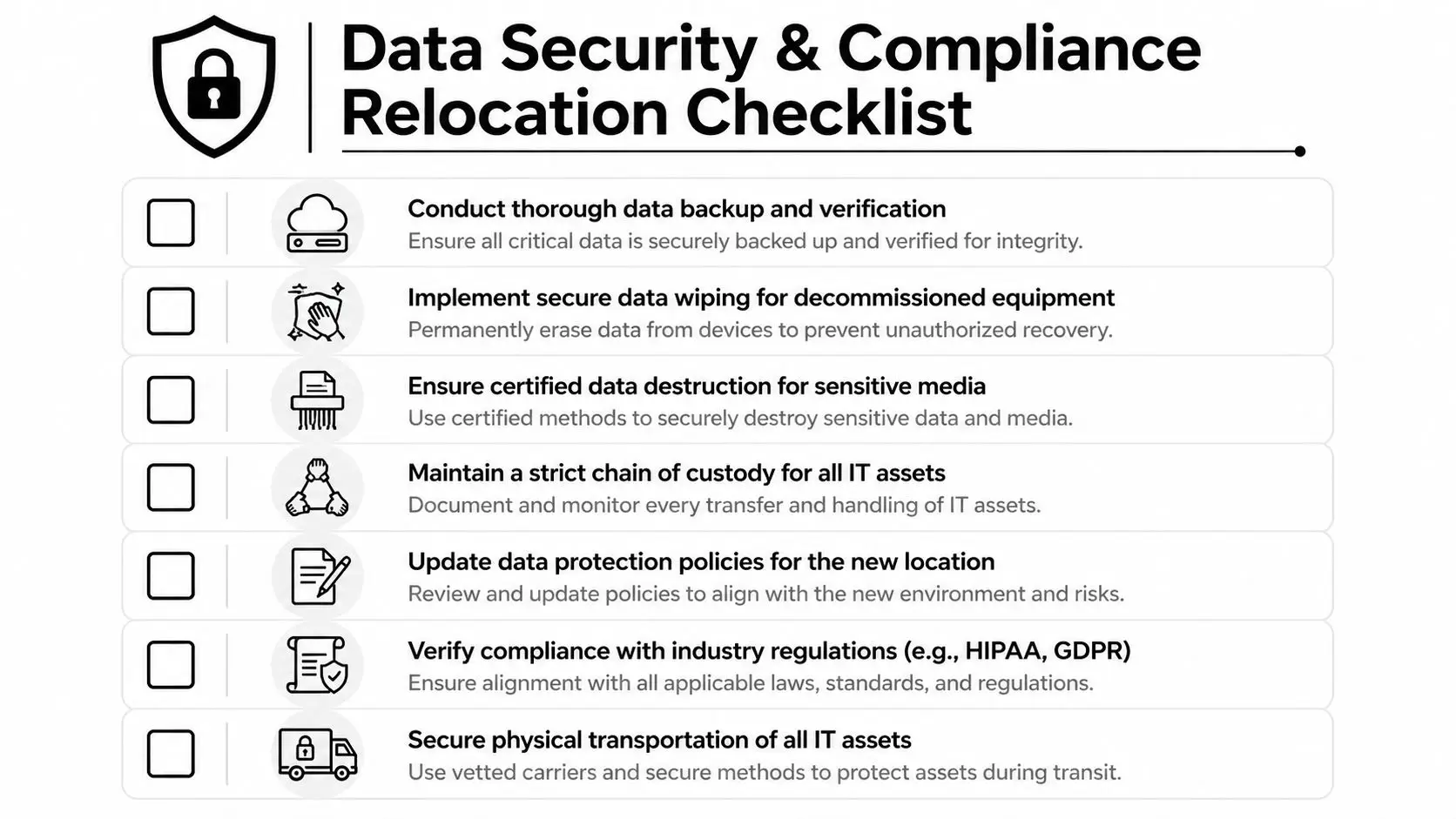
The operational value of preparation is measurable. Comprehensive pre-move IT assessments, including equipment inventories, network mapping, and dependency identification, can reduce IT setup time at the new site by up to 50%. Unlabeled cables alone can cause 30-40% longer reconnection times.
What chain of custody looks like in practice
Chain of custody isn’t abstract paperwork. It’s a simple question answered consistently: where is each data-bearing asset, and who had control of it at each step?
A usable process includes:
Serialized inventory creation
Record asset type, assigned user or location, and whether the asset will move, be stored, or be destroyed.Physical segregation
Separate live move assets from decommissioned assets before packing starts.Controlled handoff
Document who releases the assets, who receives them, and when.Final disposition record
Keep certificates and reconciliation records with the move file.
Wiping versus physical destruction
Not every device should be handled the same way. Equipment being redeployed may be eligible for data wiping if the process meets your internal policy and downstream use case. Media that won’t be reused, or that carries higher sensitivity, is often a better candidate for physical destruction.
If your team can't explain why a device was wiped instead of destroyed, or destroyed instead of wiped, your policy probably isn't ready for move week.
Documentation matters as much as the action itself. If the file for your move contains pickup logs, serialized inventories, destruction records, and recycling documentation, you can answer audit questions later instead of reconstructing events from email threads.
The pre-move assessment should be highly specific
A good assessment goes beyond counting devices. It should identify:
- network dependencies
- rack elevations or cabinet placement needs
- special power or cooling considerations
- cable labeling standards
- users with nonstandard peripherals
- devices that must remain online until the final cutover
For organizations aligning their sanitization process to recognized guidance, NIST SP 800-88 resources are worth reviewing before the move plan is finalized.
How to Plan Your Relocation Timeline and Budget
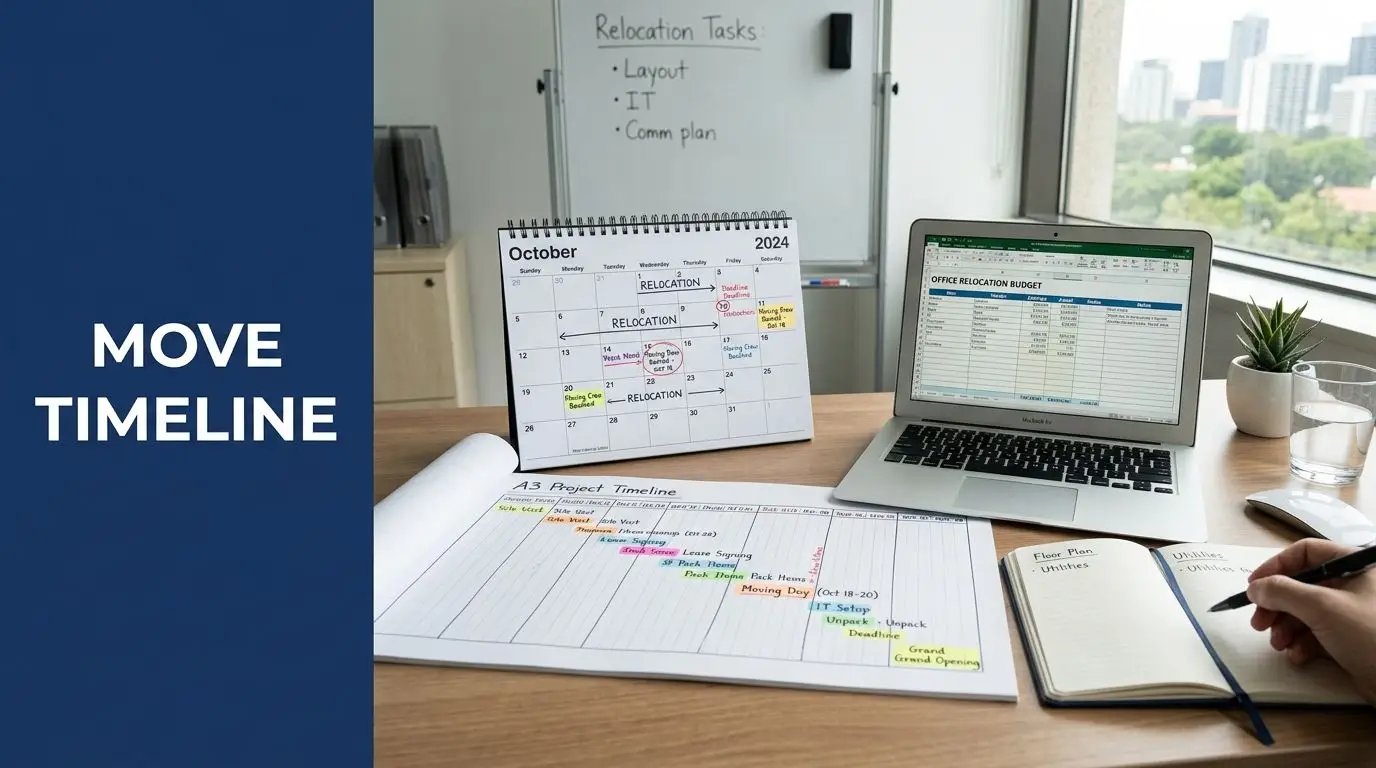
Moves go off track when teams build the schedule around lease dates and loading docks alone. Your real timeline should be built around decision points: what stays, what goes, what gets retired, and when systems can be interrupted.
This is a mature market for a reason. The global office relocation services market was valued at US$ 10.6 billion in 2022 and is projected to reach US$ 14.6 billion by 2032, with North America holding a 42% market share. Specialized logistics, project coordination, and technical handling are normal parts of business moves.
A workable planning rhythm
Use the calendar backward from occupancy and keep the asset decisions early.
| Phase | Focus |
|---|---|
| Early planning | inventory, vendor scope, floor plans, decommission list |
| Mid-project | labeling, packing standards, cutover sequencing, user communication |
| Final preparation | staged pickups, cable maps, access timing, disposal chain of custody |
| Move and stabilization | transport, reconnects, testing, issue resolution, record reconciliation |
Where budgets usually get distorted
Office relocation services are often underbudgeted because teams price only the visible move. Key cost drivers include technical labor, after-hours scheduling, secure handling requirements, temporary storage, decommissioning work, and the documentation needed to close the project cleanly.
Hybrid work adds another layer. Some groups need phased moves, staggered workstation deployment, or temporary storage while headcount and seating plans settle. That’s manageable if the vendor can support a modular scope. It becomes expensive when the move is planned as one event but executed as several unplanned ones.
A realistic budget separates transportation costs from IT relocation, disposition, and post-move support. That keeps surprises from hiding inside a single line item called “moving.”
Choosing the Right Partner A Vendor Selection Checklist
The fastest way to spot the wrong vendor is to ask detailed questions early. Weak providers stay broad. Qualified providers can explain procedures, documentation, exceptions, and who owns each handoff.
Questions that reveal real capability
Use this checklist in calls and bid reviews.
How do you identify data-bearing assets before move week?
You want a documented intake process, not a promise to “handle that on site.”What is your chain-of-custody process during removal and transport?
Ask what records you’ll receive and who signs each transfer.Can you separate relocation inventory from retired equipment?
Mixed handling is where loss, confusion, and accidental retention usually start.How do you support phased moves for hybrid teams?
This matters because many office relocation resources overlook phased moves, transparent cost models, temporary storage, staged IT disposition, and logistics for dispersed assets.What happens after the truck unloads?
Good vendors define testing support, punch-list ownership, and issue escalation.
Ask for scope before you ask for price
A clean scope of work prevents most disputes. If you want a simple outside reference for how detailed a scope should be, Templeton Built's project game plan is a useful reminder that execution problems usually start with vague deliverables.
The right vendor can explain their process without relying on sales language. The wrong one keeps saying “we do it all” and can’t describe the chain of events.
Due diligence points that matter
Review these before award:
- insurance tied to the actual scope
- documented handling for electronics and storage media
- recycling and destruction records
- escalation contacts for move week
- clarity on subcontractors
- procedures for exceptions and missing assets
If you need a formal framework for internal review, a vendor due diligence checklist helps procurement, facilities, and IT evaluate the same risks using the same criteria.
Streamline Your Move with Integrated ITAD Services
Friday at 5 p.m., the movers are waiting on dock access, your network team is labeling switches, and a pile of retired laptops is still sitting in a conference room with no final disposition assigned. That is how office moves drift into preventable risk. Equipment without a documented next step slows the move, confuses chain of custody, and creates data exposure at the worst possible time.
Integrated IT asset disposition keeps the relocation plan tied to asset control from day one. Every device should have a status before move week starts: relocate, redeploy, store, sanitize for resale, destroy, or recycle. That decision affects packing methods, truck space, labor, insurance, and who signs off on custody at each handoff.
The operational benefit is straightforward. Teams avoid loading equipment that should have been retired, paying to move dead assets to a new site, or discovering after cutover that backup drives and network gear were mixed in with furniture overflow. In practice, the best move plans treat ITAD as part of the relocation workflow, not as a cleanup task after the fact.
Beyond Surplus provides removal, secure data destruction, compliant recycling, and value recovery as part of business IT asset workflows. For a facility or IT manager, that usually means fewer vendors to coordinate, clearer documentation, and less confusion about where retired equipment went and how it was processed.
That model still applies if you split the work across multiple providers.
Use one inventory. Use one timetable. Use one ownership trail for exceptions, missing assets, and final disposition records. If the relocation vendor, internal IT team, and ITAD provider are each working from different asset lists, the move may finish on schedule and still fail the audit.
A successful office move shows up in Monday's first hour. Users log in. Priority systems come online. Retired assets are out of the space. The documentation file is complete, and no one is chasing a box of unaccounted-for drives.
If your organization is planning an office move, contact Beyond Surplus for certified electronics recycling and secure IT asset disposal that supports relocation, decommissioning, and compliance.