Your team gets the budget number after the project scope is already set. The carrier handoff is scheduled, the branch expansion is approved, and the OEM quote lands with lead times that don’t fit the rollout. That’s usually when buyers start looking at the secondary market.
The mistake is treating used telecom gear like a bargain bin. Smart teams buy used telecom equipment as a controlled procurement strategy. They know where the savings are real, where the risk hides, and which questions separate a solid supplier from a future outage.
The Strategic Case for Used Telecom Equipment
Most telecom buyers arrive at the secondary market for one of three reasons. They need hardware faster, they need to stretch capex further, or they need to support a legacy environment the OEM has already moved past. Those are all valid reasons. None of them justify sloppy buying.

The market itself shows this isn’t fringe behavior. The global refurbished networking equipment market was valued at USD 145.5 billion in 2024 and is projected to grow to USD 170.52 billion by 2033, expanding at a CAGR of 4.6% according to Custom Market Insights on refurbished networking equipment. Buyers don’t keep moving into a category at that scale unless it solves real operational problems.
Where used gear makes sense
Used telecom equipment works well when you need:
- Like-for-like replacement for installed Cisco, Juniper, Adtran, or similar platforms
- Spare inventory for field failures and maintenance windows
- Lab and staging gear for testing before a larger migration
- Interim capacity while a broader architecture shift is still in flight
If you’re balancing branch connectivity, SIP migration, and WAN redesign at the same time, architecture discipline matters just as much as hardware pricing. A practical reference for distributed voice planning is this VoIP guide for multi-site offices, especially when equipment choices affect call routing and survivability.
Buy used hardware when it solves a timing, budget, or lifecycle problem. Don’t buy it just because the quote is low.
The real procurement mindset
Good buyers don’t ask, “Is used safe?” They ask, “Under what controls is this safe?” That means documented testing, compatibility checks, warranty terms, and exit planning before the PO goes out.
For teams that also need an end-of-life path for retired carrier and network assets, it helps to understand how the secondary market connects to telecom equipment buyers. The buy side and the disposition side affect each other more than most procurement teams realize.
Sourcing and Vetting Your Equipment Supplier
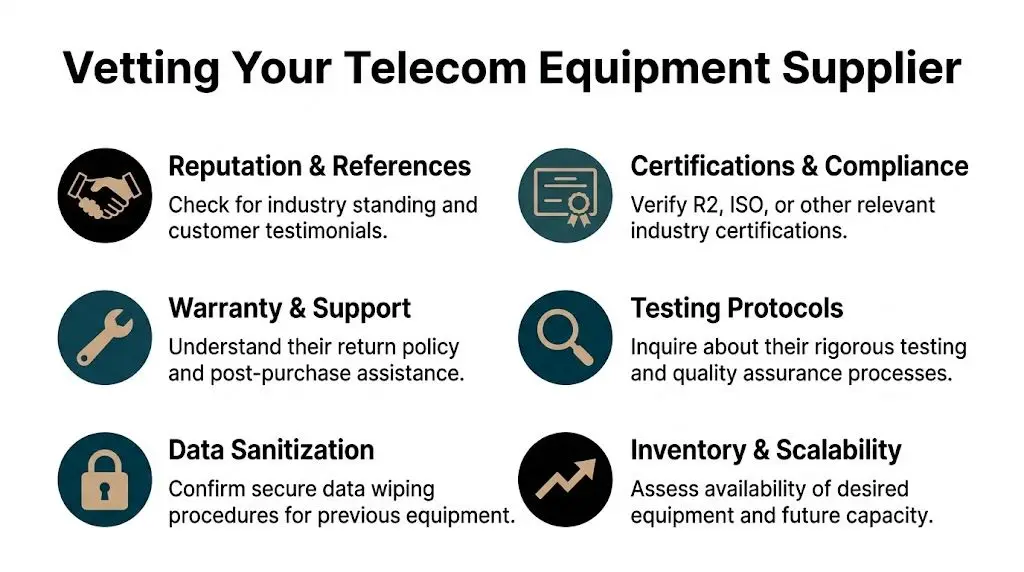
A bad supplier can erase every savings line on the quote. I have seen low-cost buys turn into overnight outages, failed audits, and emergency replacements because the seller could not prove where the hardware came from, how it was tested, or whether data-bearing components were sanitized before resale.
Supplier type changes your risk profile. Marketplace sellers can work for low-value accessories or noncritical spares, but support often ends at shipment. Brokers widen your sourcing options, which helps on scarce SKUs, yet many never physically handle the inventory they quote. Refurbishers and ITAD-driven sellers usually offer the best control because they receive, inspect, test, document, and package the gear in-house. For production telecom equipment, that is the group I qualify first.
What to verify before you ask for pricing
Start with process, not discount. A vendor that cannot explain its intake, testing, sanitization, and documentation workflow will usually create problems later in receiving, deployment, or compliance review.
Use this checklist:
- Business track record. Ask how long the company has operated in secondary market telecom and what share of its business comes from enterprise or carrier clients.
- Certifications and operating controls. Look for standards such as ISO 9001, TL 9000, or R2v3 when the seller also handles asset disposition and sanitization. The certificate matters less than whether the process shows up in receiving, testing, and recordkeeping.
- Source of inventory. Ask whether the equipment came from direct enterprise deinstallations, carrier surplus, trade-ins, lease returns, or other brokers. Direct-source inventory usually gives cleaner chain-of-custody records.
- Testing depth. “Tested” is too vague. You want to know whether they perform POST only, full port tests, burn-in, optics verification, power supply checks, and module-level validation.
- Data handling controls. If the gear includes storage, logs, call records, or removable media, ask for their sanitization method and what documentation they can provide.
- Support after delivery. Confirm who handles DOA claims, advanced replacement, troubleshooting, and escalation. If support is outsourced or undefined, plan for slower recovery and more internal labor.
- Packaging discipline. Chassis, blades, optics, and cards need ESD-safe packing and transit protection. Good hardware still fails if it is packed like office surplus.
Questions that expose weak suppliers
The fastest way to pressure-test a seller is to ask for specifics and stay quiet until they answer.
- What does your incoming inspection include for this exact product family?
- Do you test every installed module, port, and power supply, or only the base chassis?
- Can you provide serial numbers before shipment and confirm they match the photos and packing list?
- Was the unit ever deployed in a regulated environment, and if so, how was sanitization handled?
- What firmware or software version is loaded today?
- What is excluded from the warranty?
- Who approves RMAs, and what is the typical turnaround for replacement stock?
Weak suppliers get vague fast. Strong suppliers answer in steps, provide sample reports, and do not hesitate when you ask for documentation.
Red flags I won’t ignore
Some issues are enough to end the conversation.
| Concern | Why it matters |
|---|---|
| Missing serial data | You lose the ability to validate asset history, support status, and consistency across chassis and modules |
| No written warranty terms | Recovery depends on verbal promises that rarely survive an RMA dispute |
| Vague testing language | “Pulled from working environment” does not tell you what was actually verified |
| Stock images only | You cannot assess real condition, installed options, or label integrity |
| No sanitization statement | Your team inherits avoidable security and compliance exposure |
| Inventory quoted but not in hand | Delivery dates slip, condition varies, and substitutions show up late in the process |
For teams that want a repeatable approval process, this vendor due diligence checklist for secondary market hardware suppliers is a practical way to standardize reviews across procurement, security, and operations.
One more point matters here. The lowest quote is rarely the lowest-cost supplier. If the seller cannot document testing, chain of custody, and post-sale support, your real cost shows up later in engineer time, incident response, replacement freight, and audit cleanup.
Inspecting Gear and Verifying Compatibility
Once you’ve narrowed the supplier list, the technical review starts. Many purchasing teams rush at this stage. They verify the model number, check the discount, and assume the rest will sort itself out. That’s how mismatched licenses, wrong optics, and unstable firmware end up in production.
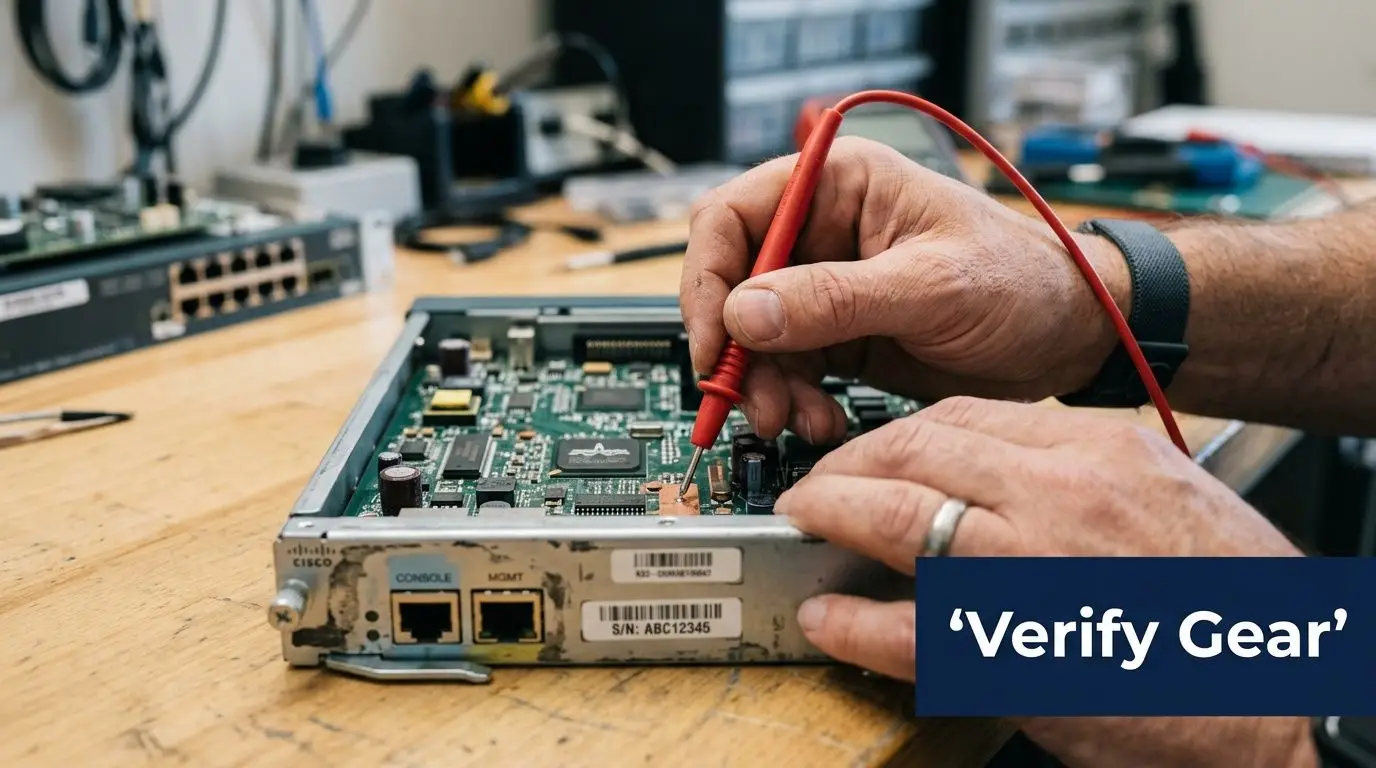
Start with the role the device will play. Core switch, edge router, session border controller, access layer expansion, transport spare. The inspection criteria should match that role. A lab spare gets one level of scrutiny. A device heading into a live financial or healthcare environment gets another.
The pre-purchase technical checklist
The first pass is physical and administrative.
- Match the exact SKU against your approved design, including airflow direction, power supply type, and interface modules
- Request high-resolution photos of front, rear, serial labels, ports, and installed cards
- Check for signs of stress, including bent ears, damaged cages, uneven screws, or discoloration near power inputs
- Confirm serial consistency across chassis and modules
- Review included accessories, especially rails, power cords, faceplates, and fan trays
Then move to functional evidence. Don’t settle for “tested.” Ask what the test proved.
Metrics that actually matter
For optics and transport hardware, ask for measurable outputs. A bit error rate of less than 10^-12 for optics and a Mean Time Between Failures exceeding 100,000 hours are key benchmarks, and Des3Tech’s evaluation guidance notes that reputable refurbished equipment can achieve 95% uptime, compared to 70% for unvetted hardware.
That gap is the difference between a procurement win and a fire drill.
Require test records that map to business use, not just bench power-on results.
Compatibility fails happen in software
Most ugly surprises in used telecom purchases don’t come from scratched chassis. They come from software state.
Check these items before you buy:
- Firmware version. Confirm it supports your current network standards and management stack.
- Boot image path. Make sure the device isn’t tied to an obsolete image you can’t legally or practically maintain.
- License status. Used hardware with non-transferable licensing can become expensive fast.
- Feature parity. MPLS, encryption, routing protocols, PoE budget, and optic support all need verification against your production use case.
A practical way to reduce post-delivery cleanup is to build a standardized acceptance workflow for every inbound switch and router. Teams handling Cisco gear often benefit from a documented process for resetting a Cisco switch before imaging, patching, and staging.
Don’t skip the environment check
The hardware can be perfect and still be wrong for your deployment.
Ask whether the unit supports your rack depth, your power standard, your cooling pattern, and your existing transceiver inventory. In mixed environments, I also want confirmation that the device will integrate cleanly with existing monitoring, logging, and backup configuration workflows.
If the supplier can’t discuss those details, they’re selling parts, not supporting outcomes.
Negotiating Price Warranty and Service Terms
A procurement team agrees on a used core switch because the quote looks excellent. Thirty days later, a power supply fails during staging, the seller wants the unit returned before shipping a replacement, freight is on the buyer, and there is no written response-time commitment. The original savings disappear fast.
That is why I treat price as only one field in the deal file. The primary negotiation is about how failure, delay, and support risk get allocated after payment.
Negotiate the downside first
Used telecom equipment can create strong savings versus new, but price alone is a weak win if the terms leave your team carrying every operational problem. I usually start with a simple question: if this device arrives dead, fails in burn-in, or drops in production inside the warranty window, what happens next, in writing?
That question changes the conversation. Serious suppliers can answer it clearly. Brokers who only know the SKU usually cannot.
Push on these points before you push for the last discount point:
- Warranty scope. Define whether coverage means repair, replacement, or parts only.
- Warranty start date. Tie it to receipt or acceptance, not invoice date, if you have a staging window.
- Advance replacement. For critical nodes, ask for cross-shipment so your outage clock does not wait on reverse logistics.
- DOA and burn-in protection. Separate early-life failure handling from the standard warranty.
- RMA turnaround. Get approval steps, response times, ship times, and freight responsibility in writing.
- Post-sale technical contact. Even limited escalation access can cut deployment delays.
- Data handling on returned gear. Returned devices should follow a documented sanitization process aligned with NIST SP 800-88 media sanitization guidance, especially if configs, logs, or certificates may still be present.
A cheap unit with weak terms is often the most expensive option in the batch.
Price negotiation works better at the package level
Single-line item haggling has limits. Suppliers have more room to adjust margin when the deal includes the full deployment kit.
Ask for the chassis, matching optics, rails, power supplies, fan trays, memory, licenses that are valid to transfer, and one or two common spares in the same quote. That does two things. It raises the odds that what arrives is deployable, and it gives you more negotiating surface than the base unit price alone.
I also ask for serial-specific documentation as part of the package, not as a favor after the PO. The minimum is a serial list and stated condition grade. Better sellers will add test records, photos, and a clear parts manifest.
Write terms for the way your team actually operates
Operations teams do not experience "warranty value" in abstract terms. They experience it in hours of downtime, engineer time, overnight freight, change-control delays, and the extra inventory you keep on hand because you do not trust support coverage.
That is the trade-off many buyers miss. Paying slightly more for faster replacement and cleaner RMA terms can lower total operating cost over the life of the asset. Finance sees a higher purchase price. Procurement should show the avoided labor, outage exposure, and emergency sourcing cost.
If the RMA process is vague before payment, it usually gets worse after payment.
A practical negotiation scorecard
Use a scorecard so the award decision does not drift toward the lowest quote by default.
| Term | Acceptable | Strong |
|---|---|---|
| Warranty | Written coverage with clear exclusions | Written coverage plus advance replacement |
| Start date | Invoice date | Receipt or acceptance date |
| RMA | Defined process | Defined process with stated turnaround and freight terms |
| DOA handling | Standard return | Separate DOA and burn-in protection |
| Documentation | Serial list | Serial list, test records, condition notes, parts manifest |
| Support | Sales contact only | Technical escalation after delivery |
| Lifecycle options | None | Buy-back, trade-in, or consignment discussion |
A used hardware negotiation should leave you with more than a lower number. It should leave you with a predictable recovery path when the hardware does exactly what used hardware sometimes does.
Ensuring Data Security and Regulatory Compliance
This is the area sellers talk around. They’ll describe testing, cleaning, and packaging in detail, then get vague when you ask about data sanitization and custody records. That should immediately change the tone of the conversation.

Used telecom equipment isn’t automatically unsafe. But buying from a seller who cannot document sanitization is a preventable risk. Some gear contains obvious storage. Other devices retain logs, configs, credentials, certificates, or cached operational data in less obvious places. Buyers who assume “network gear doesn’t store anything important” usually haven’t done enough incident review.
The compliance blind spot
One of the most common purchasing mistakes is treating data security as the previous owner’s problem. It becomes your problem the moment that hardware enters your environment.
According to CES Telecom’s compliance discussion, 28% of enterprise data breaches originate from reused hardware with inadequately cleared data, and buyers who can’t obtain a certificate of data destruction aligned with NIST 800-88 take on significant liability. That’s the stat that should end any casual marketplace purchase for regulated environments.
What to require from the seller
Ask for proof, not reassurance.
- Certificate of data destruction for any equipment that may contain storage or retained system data
- Method used for sanitization, with explicit mention of a recognized process such as NIST 800-88
- Chain-of-custody records that show where the equipment came from and how it was handled
- Asset identifiers tied to the sanitization record
- Written statement of responsibility if a drive, module, or embedded storage component was removed before resale
If the seller says the gear came from a clean corporate environment and “should be fine,” that is not documentation.
Security due diligence isn’t paperwork for auditors. It’s the control that keeps inherited data, malware, and custody disputes out of your network.
Regulated buyers need a higher standard
Healthcare, finance, education, and government teams should assume every audit question will eventually become a document request. If your file contains only an invoice and a packing slip, you’re exposed.
Use this short review before approving a purchase:
- Does the hardware class have any persistent storage or configuration retention?
- Did the seller certify sanitization in writing?
- Can the seller trace the asset from intake to resale?
- Are serial numbers tied to the paperwork?
- Would your compliance team accept this file in an audit?
For buyers building a formal process around sanitization evidence, NIST SP 800-88 guidance is the baseline reference worth keeping in your internal workflow.
Don’t separate procurement from security
Procurement owns the commercial terms. Security and infrastructure teams own acceptance risk. If those groups review used hardware independently, gaps appear fast.
I’ve had the best results when the PO cannot move until three conditions are met. The network team signs off on compatibility, security signs off on sanitization documentation, and procurement signs off on warranty and return terms. That sounds heavier than a fast secondary-market purchase should be, but it prevents the expensive kind of speed.
Evaluating Total Cost of Ownership and Resale Value
A cheap box can be an expensive asset. That’s the sentence I wish more teams put at the top of their sourcing spreadsheet.
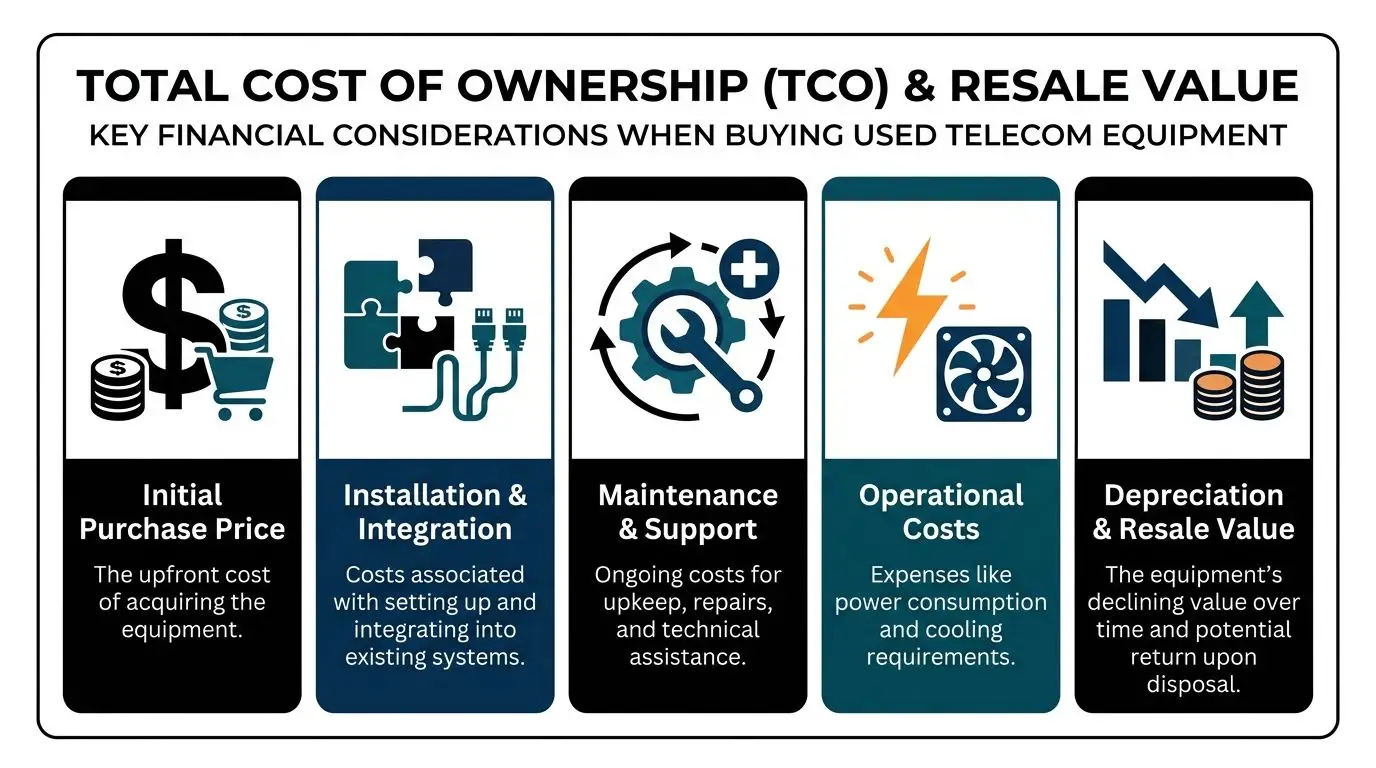
The right way to buy used telecom equipment is to model the full lifecycle. Purchase price matters, but so do installation effort, spare strategy, support burden, downtime exposure, and what happens when the asset leaves service.
The TCO trap
Used gear often delivers major front-end savings. But BrightStar Systems’ discussion of used telecom equipment notes that while initial cost savings can be 60-80%, TCO can increase by 25-40% when equipment isn’t properly vetted, and some analyses show refurbished hardware can fail up to 3x faster under load than new OEM gear.
That doesn’t mean used gear is a bad decision. It means unmanaged used gear is a bad decision.
Build a practical TCO model
I use five categories when reviewing a purchase:
| Cost area | What to include |
|---|---|
| Acquisition | Unit price, shipping, taxes, accessories |
| Deployment | Staging, imaging, installation labor, compatibility fixes |
| Operations | Power, cooling, monitoring effort, spares held on shelf |
| Support risk | Warranty gaps, replacement delays, outage impact |
| End of life | Removal, resale, recycling, logistics |
The category many teams underweight is support risk. If a low-cost switch fails in a test rack, it’s annoying. If a low-cost router fails in a remote production site and no one negotiated advance replacement, the cheap purchase stops looking cheap.
Residual value should be part of the buy decision
Procurement teams often think about resale only when the refresh starts. That’s too late. Future value is influenced at the time of purchase by model popularity, software supportability, documentation quality, and whether licenses or warranty rights can transfer cleanly.
Buying discipline increases exit value. Clean records, matched accessories, and traceable ownership make a future resale or buy-back conversation much easier.
If you already know the equipment is a bridge asset rather than a long-term platform, factor disposition into the business case on day one. A secondary-market purchase with an organized exit path can outperform a cheaper purchase that becomes stranded inventory.
For organizations that want to understand how recovery value fits into asset lifecycle planning, this overview of IT equipment resale in Georgia is a useful reference point for thinking about remarketing and end-of-life value recovery.
A simple internal decision test
Approve the used purchase if all of these are true:
- The hardware matches a defined production or spare use case
- The supplier has documented testing and a workable support process
- Security documentation is complete
- The deployment team understands firmware and licensing implications
- The likely resale or retirement path is known in advance
If one of those is missing, the lowest quote usually becomes the most expensive option over the asset’s life.
Beyond Surplus helps organizations manage the other side of this lifecycle with secure IT asset disposition, certified data destruction, electronics recycling, and value recovery services for retired telecom and IT hardware. If you need a compliant partner for decommissioning, chain-of-custody documentation, or IT asset recovery, contact Beyond Surplus.