Your lease is ending. Facilities is comparing floor plans. HR is thinking about commute impact. Finance wants the move done without budget drift. IT is staring at the main problem: what happens to racks, laptops, drives, phones, access points, backup devices, and all the old gear nobody remembered until the packing labels came out.
That’s the new reality of office relocation. It isn’t a furniture project with a cabling checklist. It’s an operational reset with data security, compliance, logistics, and business continuity all tied together. The companies that handle this well start treating asset disposition as part of the move plan, not the cleanup at the end.
Introduction The New Reality of Corporate Moves
Corporate moves aren’t rare side events anymore. Between March 2022 and March 2023, 593 U.S. public companies relocated their headquarters, a 29% increase from the prior year and the highest annual total in seven years, according to Clancy Moving’s review of SEC relocation data. That matters because every move creates two IT streams at once. One stream has to stay live. The other has to be retired without exposing the company.

Hybrid work changed the shape of the project. Many companies aren’t just moving. They’re shrinking, consolidating, creating touchdown space, or separating production infrastructure from employee workspace. That exposes a familiar mistake. Teams spend months on furniture, signage, and occupancy dates, then treat retired IT assets as a loading dock problem.
It isn’t. Old equipment carries data liability, lease obligations, and disposal requirements. A move tends to surface forgotten storage arrays, spare laptops, legacy switches, and desktop towers from past refresh cycles. If those assets aren’t identified early, they clog the move, inflate freight volume, and increase the chance that something leaves the building without proper documentation.
Practical rule: In an office relocation, every asset should be assigned one of three paths before move week starts. Keep, resell, or recycle.
That’s why an IT-led relocation plan works better than a mover-led one. The move should begin with inventory and disposition strategy, then flow into decommissioning, transport, reinstall, and post-move reconciliation. Teams that need local operational support often start by reviewing providers experienced with office movers in Atlanta, GA and then narrowing vendors by chain-of-custody, technical handling, and compliance documentation.
Building Your Strategic Relocation Blueprint
A strong relocation plan starts earlier than often assumed. If leadership waits until the lease paperwork is final and the furniture schedule is active, IT has already lost time.
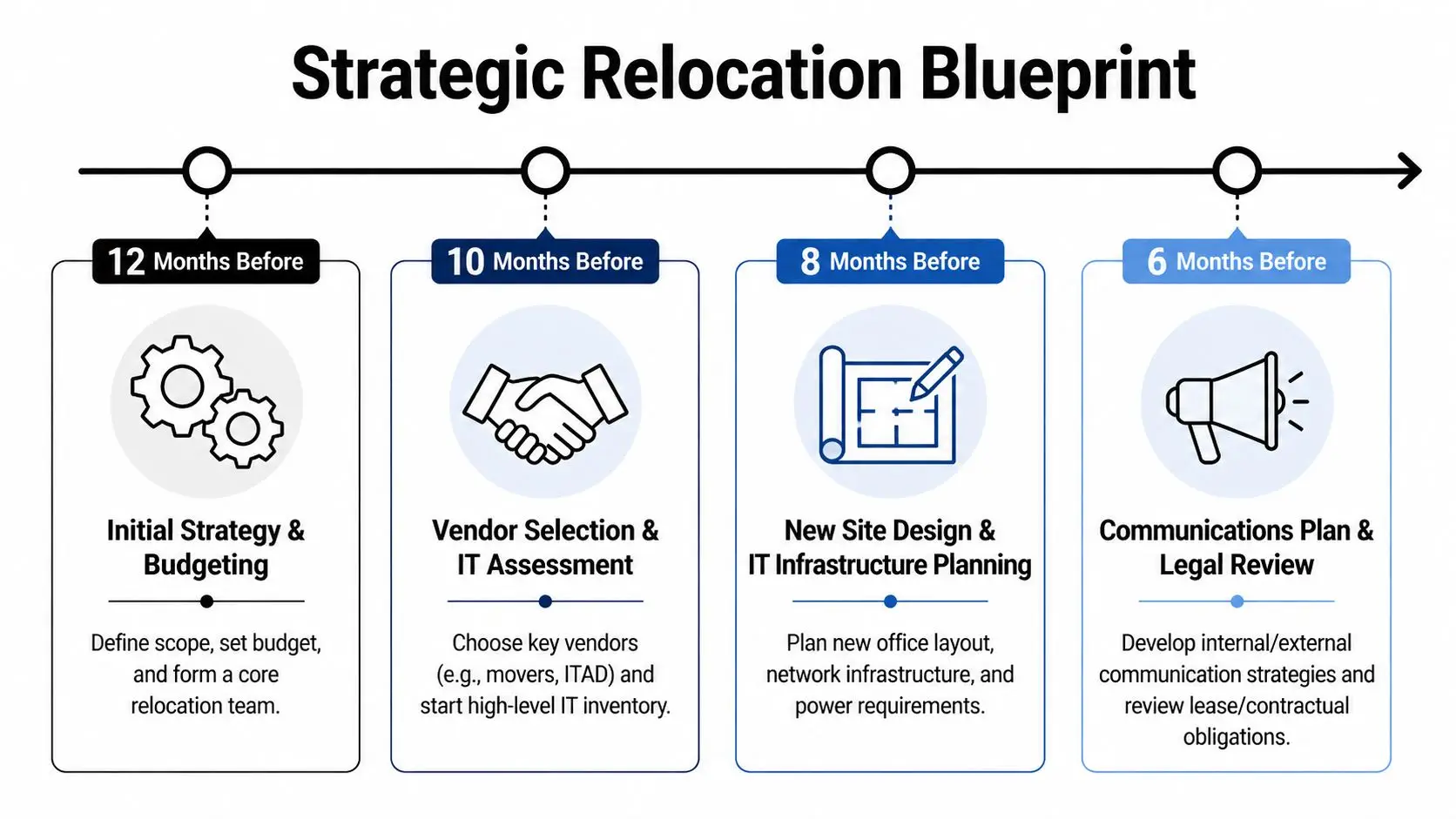
Poor planning still causes the same expensive failures. According to Hughes Marino’s office relocation analysis, 60% of office relocation failures stem from poor planning and inadequate change management, often resulting in a 15-30% productivity loss and a 20% spike in voluntary employee turnover. That’s why the blueprint has to be operational, not decorative.
Build the team before you build the timeline
The best relocation teams are small enough to make decisions and broad enough to catch risk early.
- IT lead: Owns infrastructure inventory, cutover sequencing, data handling, and vendor technical scope.
- Facilities lead: Owns floor plans, power, access, loading dock coordination, and landlord requirements.
- HR and communications: Handles move notices, training, seating changes, and employee readiness.
- Finance and procurement: Tracks approvals, budget controls, contracts, and asset value recovery.
- Legal or compliance: Reviews retention rules, regulated data exposure, and disposal documentation.
A project plan without named owners turns into a meeting series. A project plan with owners becomes a decision system.
Budget for what usually gets missed
Most office relocation budgets catch rent, movers, furniture, and cabling. They miss the expensive edge cases.
Common misses include:
- Network build-out changes: New rack layouts, patching, circuits, wireless redesign, and power corrections.
- Specialized electronics handling: Anti-static packing, crating, serial-level tracking, and technical labor.
- Disposition costs and credits: Some assets create cost because they require destruction. Others return value through resale.
- Storage overlap: Delays between lease exit, construction, and occupancy can force temporary holding.
If your workplace team is also redesigning workstations or collaboration areas, it helps to consult firms that already handle Gates Home Furnishings for businesses so the furniture and IT schedules don’t collide.
Don’t approve a move budget until you’ve separated retained assets from retired assets. Otherwise you’re paying to move equipment you should have removed weeks earlier.
Choose the ITAD partner early
This decision changes the rest of the project. A qualified IT asset disposition partner should be engaged while the inventory and scope are still being built, not after the first pallet shows up in the staging room.
Look for:
- Documented chain of custody
- Data destruction options matched to asset type
- Serialized reporting
- Recycling and destruction certificates
- Ability to coordinate pickups around phased moves
- Experience with enterprise decommissioning and logistics
That early selection prevents the usual scramble. It also gives the team time to align decommissioning windows, audit records, and value recovery. If you’re comparing providers, a useful starting point is reviewing specialized office relocation companies that understand both moving workflows and IT disposition requirements.
Auditing Your IT Ecosystem for the Move
Most office relocation problems start with a bad inventory. Not an incomplete spreadsheet. A genuinely wrong picture of what the company owns, where it sits, what it connects to, and whether it should be moved at all.
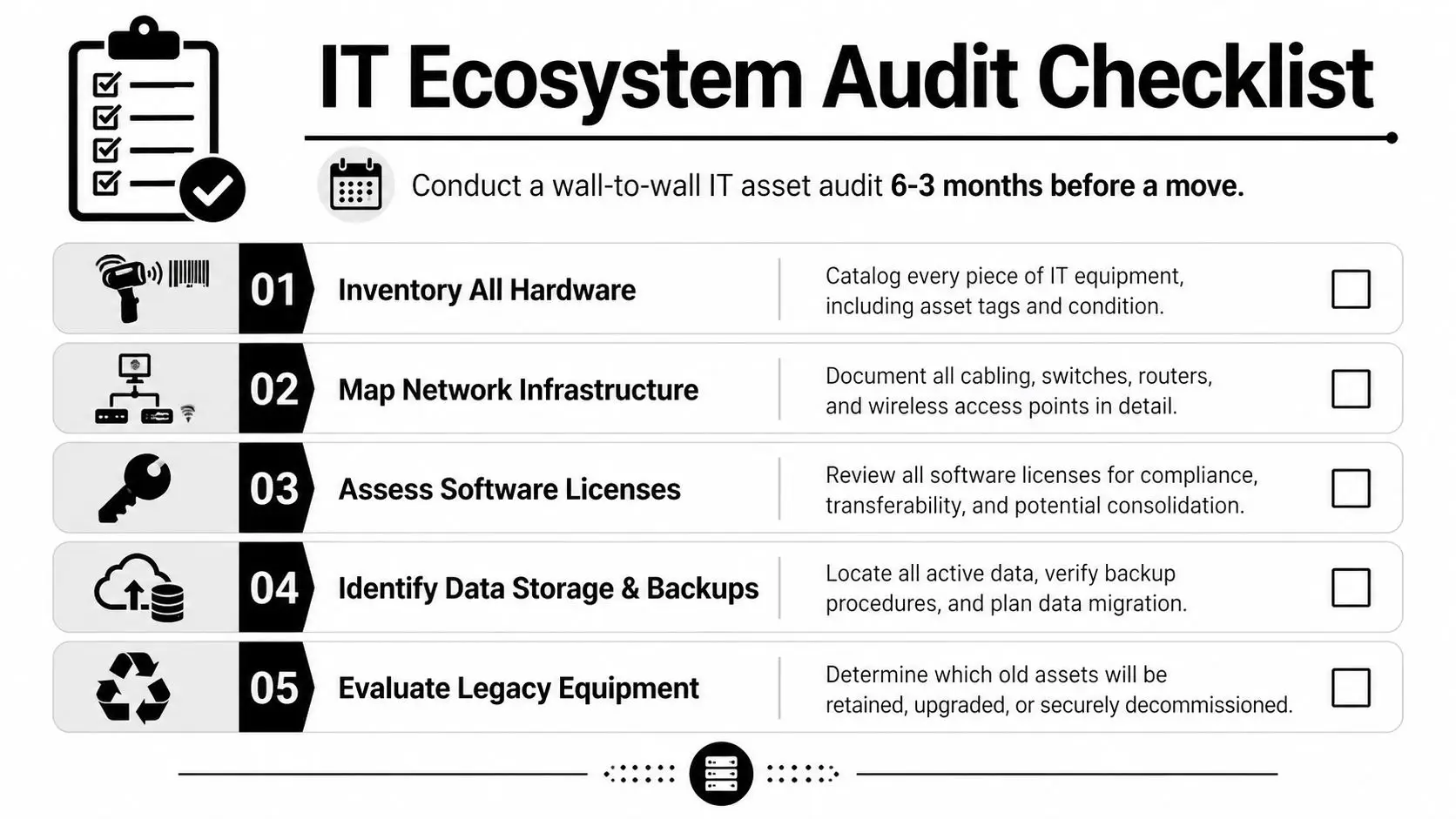
A useful audit doesn’t stop at counting devices. It classifies them by operational role and disposition path. That’s how you keep the move from becoming a warehouse transfer.
Use a keep resell recycle model
Every hardware class needs a decision.
| Asset type | What to confirm | Typical decision driver |
|---|---|---|
| Servers and storage | Application dependency, warranty status, age, backup state | Keep if still required, retire if replaced |
| Laptops and desktops | User assignment, specs, lease status, condition | Keep for active staff, resell or recycle surplus |
| Networking gear | Port count, firmware, topology role, replacement plan | Keep if compatible with new design |
| Printers and peripherals | Utilization, support status, footprint | Reduce if hybrid model lowers demand |
| Mobile and edge devices | Enrollment status, user mapping, data exposure | Wipe and reissue, or retire securely |
A good audit also captures serial number, asset tag, location, assigned user, condition, and final disposition decision. If that sounds tedious, it is. It’s still cheaper than moving dead assets and discovering missing equipment after occupancy.
Map the dependencies, not just the hardware
The riskiest devices in a move are rarely the heaviest. They’re the unlabeled ones running something obscure that nobody notices until a team loses access.
Track:
- Network dependencies: Core switches, uplinks, firewalls, access points, and room-level patching
- Application dependencies: File shares, print workflows, licensing servers, badge systems, conference room tech
- Data dependencies: Local storage, external media, backup appliances, and department-owned drives
- Building systems overlap: Security, smart entry, and connected office controls
For organizations redesigning workplace access in the new site, it helps to review options for smart access for commercial buildings so entry systems and user provisioning are part of the same move conversation.
The inventory should answer one hard question for every item: what breaks if this doesn’t arrive, doesn’t power on, or shouldn’t be moved?
What the audit should produce
By the end of the audit window, the team should have:
- A serialized master inventory
- A disposition list for retired assets
- A retained-asset move list
- A dependency map for business-critical systems
- A draft buyback or recovery list for reusable equipment
That dataset becomes the operating document for the relocation. It also improves long-term governance. Teams looking to formalize that workflow often use an IT asset lifecycle management process so procurement, deployment, retirement, and reporting connect cleanly.
Managing Secure IT Decommissioning and Data Liability
Office relocation stops being a facilities task and becomes a liability management exercise. Once an asset is marked for retirement, the company has one obligation above all others: control the data until destruction is complete and documented.

The standard isn’t guesswork. Matterport’s move management guidance notes that IT infrastructure transition should follow a rigorous methodology, including use of certified ITAD partners for secure data wiping or shredding that meets NIST 800-88 and provides chain-of-custody certificates compliant with the FTC Disposal Rule.
Wiping and shredding serve different purposes
A lot of teams ask which method is better. That’s the wrong question. The right question is which method fits the device, the data sensitivity, and the reuse plan.
Data wiping works when the asset still has reuse value and the drive technology supports verified sanitization. This is often the path for laptops, desktops, and some servers that can be resold or redeployed.
Physical shredding is the right choice when policy requires destruction, the media is damaged, the chain of custody was broken, or the organization doesn’t want the device reused. This is common for failed drives, heavily regulated environments, and systems with data classes that legal or compliance won’t release for resale.
Why DIY fails
Internal teams often assume they can handle retired assets because they already manage devices in production. Decommissioning is different.
DIY approaches usually break down in four places:
- No complete asset reconciliation: Devices leave closets and storage rooms without being matched back to the inventory.
- Inconsistent media handling: Some drives are removed, some are left inside equipment, some are boxed without labels.
- Weak documentation: There’s no final record tying serial number to destruction method and date.
- Liability confusion: If a third party touches the equipment without proper transfer documentation, responsibility gets blurry fast.
If you can’t prove what happened to a retired drive, assume the risk still belongs to your organization.
Chain of custody is the control point
During an office relocation, equipment changes hands constantly. Desk-side technicians hand devices to movers. Movers hand pallets to warehouse staff. Receiving teams unbox gear at the new site. Every handoff is a control point.
That’s why chain-of-custody discipline matters more than general moving experience. For decommissioned assets, every pickup and transfer should be documented, signed, and traceable. For retained assets, sealed labeling and serialized manifests reduce confusion during reload and reinstall.
A proper process should include:
- Collection against approved asset list
- Segregation of retain versus retire inventory
- Serialized tracking at pickup
- Controlled transport
- Recorded destruction or sanitization outcome
- Final reporting with certificates
One option organizations use for this phase is a provider with data center decommissioning services that covers equipment removal, logistics coordination, data destruction, and reporting in one workflow. The practical value isn’t branding. It’s reducing handoffs between unrelated vendors.
Don’t ignore the hidden retired assets
Moves expose equipment that never made it into refresh records. Spare drives in drawers. Test servers in lab rooms. Old copiers with storage. Conference room PCs. Badge system controllers. Network gear from previous fit-outs.
Those are often the biggest risk because they aren’t in the expected retirement queue. The team only finds them during pack-out, when people are rushed and every extra item feels like an exception. Build a late-discovery procedure before move week. Someone should have authority to quarantine found equipment, log it, and route it to approved disposition.
The documents that matter at the end
A compliant decommissioning event should close with records your legal, compliance, and procurement teams can use.
Keep these:
- Certificate of data destruction
- Certificate of recycling
- Serialized asset report
- Settlement or value recovery report for resale items
- Pickup and transfer records
Those documents do more than satisfy auditors. They close the project. Without them, office relocation remains operationally finished but administratively open.
Coordinating Seamless Logistics and Transit
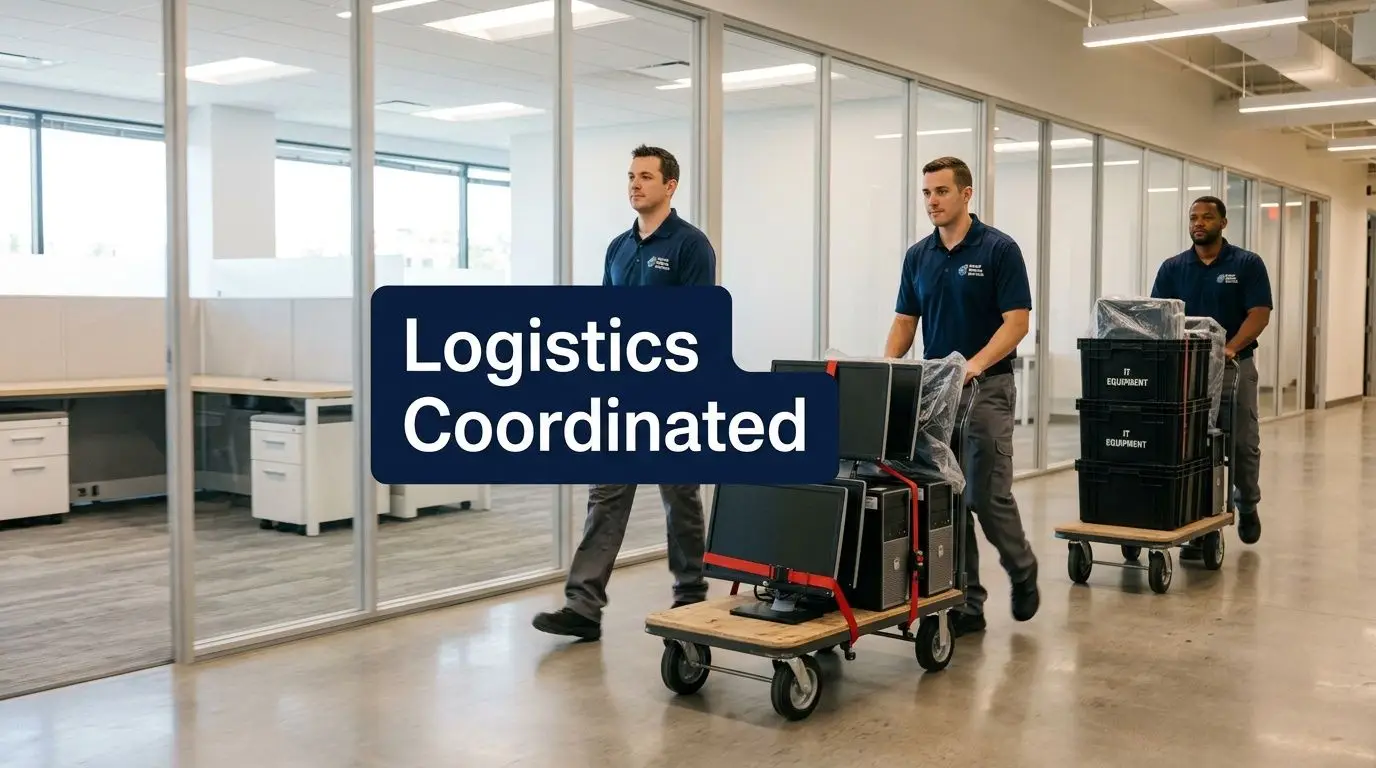
Once the retirement stream is separated, the retained equipment still has to survive the trip. That requires more than strong boxes and careful drivers.
Pack for reinstallation, not just transport
A common failure in office relocation is packing gear in a way that gets it to the destination but makes reinstall slow and error-prone. Cables get detached without labels. Rack hardware is mixed together. Peripheral kits lose power supplies.
Pack by destination and dependency group:
- User endpoint kits: Laptop dock, monitor cables, keyboard, mouse, headset, assigned label
- Closet and rack kits: Mounting rails, power cords, patch leads, SFPs, management tags
- Room systems: Display components, compute unit, controller, adapter set, labeled room ID
Match transport to the hardware
Sensitive electronics need proper handling. Anti-static wrap, padded cases, and custom crating matter for fragile or high-value gear. For servers, storage, and networking equipment, use transportation methods that reduce vibration and environmental swings. Climate-controlled vehicles and air-ride suspension are worth the extra coordination when uptime matters.
Control handoffs on both ends
The truck isn’t the only risk point. The loading dock and the receiving floor create just as many losses as the road does.
Use a simple transit discipline:
- Load against manifest
- Seal or tag critical containers
- Confirm arrival by item group
- Hold damaged or suspect equipment aside for inspection
- Coordinate electricians and low-voltage teams before rack arrival
Fast load-ins come from preassigned room and rack destinations. Slow load-ins happen when every cart becomes a hallway decision.
A move crew should never be deciding where technical equipment belongs. The destination map must already exist.
Post-Move Operations and Value Realization
The first few days after occupancy tell you whether the relocation plan was operationally sound or just well scheduled. Systems need to come online in sequence. Core network first, then identity and access, then shared services, then user endpoints, then room technology.
The follow-through matters because Relocation Strategies reports that 40% of organizations face extended IT disruptions after relocation due to unaddressed Moves, Adds, and Changes for hybrid office setups. The move doesn’t end when equipment is in the building. It ends when the environment works for the way people use it.
Validate the environment in production order
Run post-move checks in this order:
- Connectivity: WAN, internet, firewall rules, Wi-Fi coverage, VLAN behavior
- Core services: Authentication, printing, file access, conferencing, telephony
- Department workflows: Finance, operations, executive support, customer-facing teams
- Space behavior: Desk booking, conference room function, badge access, peripheral coverage
A snag list should be active from day one. Not every issue needs a war room, but every issue does need an owner and due date.
Close the loop on retired assets
Financial recovery and compliance closure happen after the move, not before it. Reconcile the final retired asset list against pickup records, destruction reports, and resale credits. If the company ran an IT buyback program, that’s when the value gets booked and matched against move cost.
For teams that want that process documented clearly, an asset recovery services workflow in Georgia shows what final reconciliation should look like. The useful part is the discipline: retired assets should end in either destruction documentation or recovery reporting, never in uncertainty.
MAC work continues after occupancy
Hybrid offices change quickly. People move teams. Conference rooms get repurposed. Extra monitors appear. Network drops need rework. That ongoing MAC workload should be planned as an operating function, not treated as leftover move debris.
Frequently Asked Questions About IT in Office Relocation
What hidden IT costs show up most often
Cabling changes, power corrections, after-hours technical labor, temporary storage, accessory replacement, and disposal handling are the usual misses. Old equipment also creates surprise cost when teams discover it late and have to route it through secure disposition on an expedited schedule.
Should data destruction happen on-site or off-site
Use on-site destruction when policy, chain-of-custody sensitivity, or internal governance requires witnessing the event. Use off-site processing when the provider’s transport controls, reporting, and facility procedures meet your requirements and the asset stream is better handled in batches. The decision should come from risk policy, not convenience.
How should a downsizing or hybrid-first office change the move plan
Reduce before you relocate. Don’t pay to move surplus endpoints, overbuilt print fleets, or inactive conference room kits. A hybrid office usually needs stronger shared infrastructure and less duplicated desk equipment. The audit should reflect how the new workplace will operate, not how the old one was set up.
Which compliance issues need the most attention
The practical baseline is secure data destruction, documented chain of custody, and retained records showing what happened to each retired asset. For regulated environments such as healthcare, finance, and government, legal and compliance teams should review the disposition process before collection begins.
What’s the biggest mistake IT leaders make in office relocation
They start with transportation instead of disposition. Once the team knows what must stay, what can be sold, and what must be destroyed, the rest of the move gets easier. If that decision waits until pack-out, the company takes on avoidable risk and unnecessary freight.
When should employees be involved
Earlier than most companies think. Users need clear instructions on device handoff, backup expectations, labeling, and what will be waiting for them at the new site. Confusion at the user level creates ticket volume that has nothing to do with infrastructure quality.
If you're planning an office relocation and need secure handling for retired laptops, servers, drives, networking gear, or a full decommissioning workflow, contact Beyond Surplus. They provide business IT asset disposition, data destruction, recycling documentation, and logistics coordination to help organizations move with less risk and better asset recovery.